Last updated: 2026-03-19
This solution article includes advanced scenarios pertaining to user merge behavior in Freshservice.
Prerequisites to user merge and applicable for the scenarios below:
1\. The users to be merged should belong to the same Freshworks Organization (Neo Admin Center).
2\. The product instances (Freshservice, Freshdesk, CSS) that the users are a part of and who need to be merged also need to be part of the same Freshworks Organization (Neo Admin Center).
3\. Only users who are requesters in the Freshservice instances can be merged together.
Merging Users Between Multiple Freshservice Instances within the same Freshworks Organization
SCENARIO 1: Merge two users who are present as requesters in two distinct Freshservice instances.
| Freshworks Organization (Neo Admin Center) | Freshservice Instance | BEFORE MERGING THE USERS | ||
| Users<br>(& Their License Type) | Primary Email | Secondary Emails | ||
| Explorer360 | Freshservice\_Instance\_1 | User A<br>(Requester) | User\_A@freshworks.com | User\_A@gmail.com |
| User B<br>(Requester) | User\_B@freshworks.com | User\_B@hotmail.com | ||
| Freshservice\_Instance\_2 | User A<br>(Requester) | User\_A@freshworks.com | User\_A@gmail.com | |
| User B<br>(Requester) | User\_B@freshworks.com | User\_B@hotmail.com |
| AFTER MERGING USER B INTO USER A | ||
| Requesters | Primary Email | Secondary Emails |
| User A<br>(Requester) | User\_A@freshworks.com | - User\_A@gmail.com<br> <br>- User\_B@freshworks.com<br> <br>- User\_B@hotmail.com |
| User A<br>(Requester) | User\_A@freshworks.com | - User\_A@gmail.com<br> <br>- User\_B@freshworks.com<br> <br>- User\_B@hotmail.com |
Merge Action: The administrator initiates a merge of User B into User A from User A’s profile in any one of the two Freshservice instances.
Expected Behavior: The profiles of both users will be consolidated as one profile.
Result:
SCENARIO 2: Merge two users across two Freshservice instances where:
| Freshworks Organization (Neo Admin Center) | Freshservice Instance | BEFORE MERGING THE USERS | AFTER ATTEMPTING TO MERGE USER B INTO USER A | ||
| Users<br>(& Their License Type) | Primary Email | Secondary Email | |||
| Explorer360 | Freshservice\_Instance\_1 | User A (Requester) | User\_A@freshworks.com | User\_A@gmail.com | The merge action cannot be achieved in this scenario as User B has an agent license in one of the Freshservice instances. Hence, the users will be retained as is without any changes. |
| User B (Requester) | User\_B@freshworks.com | User\_B@hotmail.com | |||
| Freshservice\_Instance\_2 | User A (Requester) | User\_A@freshworks.com | User\_A@gmail.com | ||
| User B (Agent) | User\_B@freshworks.com | N/A (Agents can have only primary email) |
Merge Action: The administrator initiates a merge of User B into User A from User A’s profile in Freshservice\_Instance\_1.
Expected Behavior: The merge action will not be allowed because if it is allowed, User B will lose their access to Freshservice\_Instance\_2 as an agent. The error below is seen.
“Cannot be merged as user\_b@freshworks.com is an agent in another Freshservice account in the same organization.“
Note: This is the expected behavior if any of the users being merged in any of the Freshservice accounts are agents.
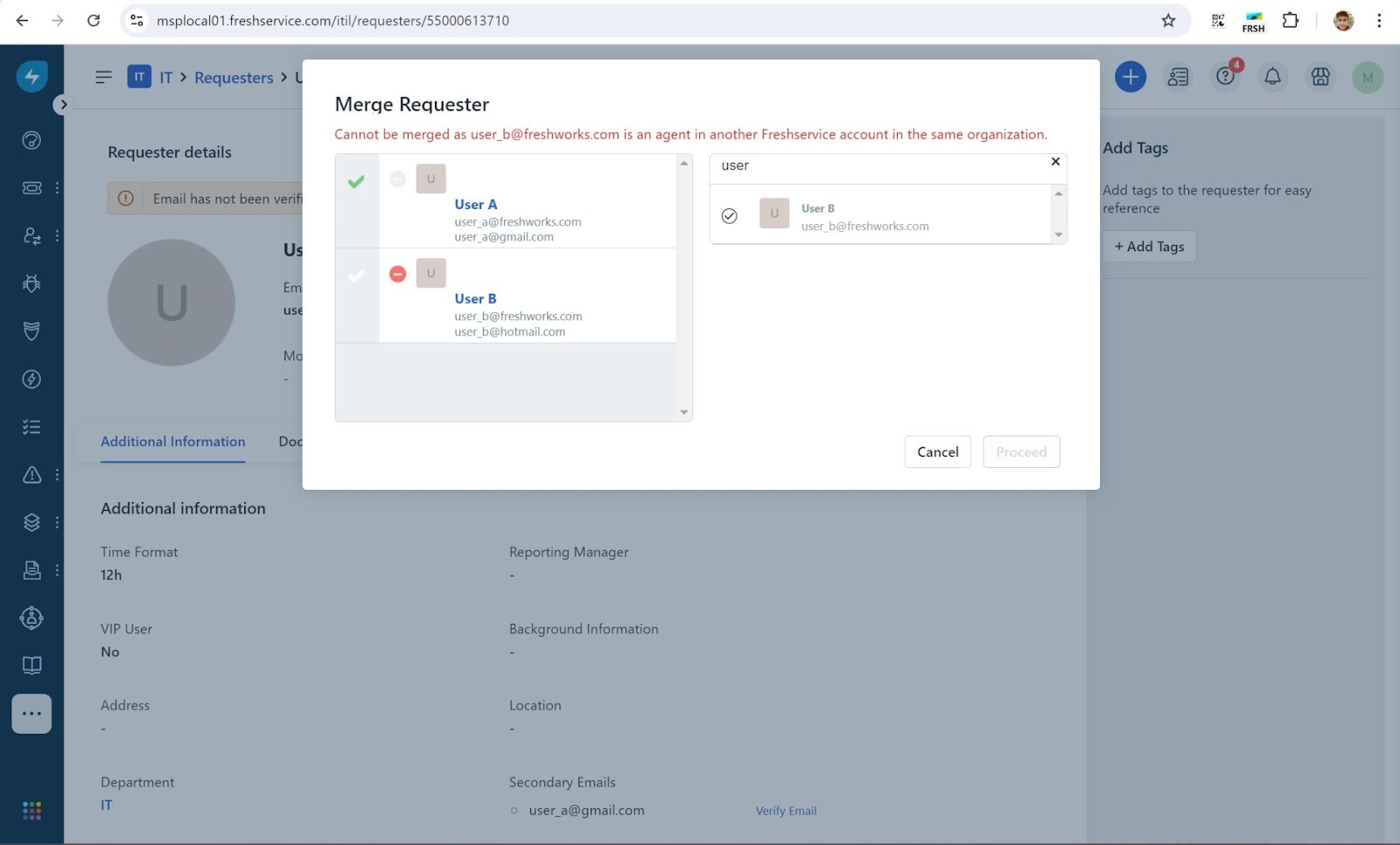
Result: User A’s and B’s profiles will be retained as is in both the Freshservices instances and Freshworks organization without any changes.
SCENARIO 3: Merge two users across two Freshservice instances where:
| Freshworks Organization (Neo Admin Center) | Freshservice Instance | BEFORE MERGING THE USERS | ||
| Users<br>(& Their License Type) | Primary Email | Secondary Emails | ||
| Explorer360 | Freshservice\_Instance\_1 | User A<br>(Requester) | User\_A@freshworks.com | User\_A@gmail.com |
| User B<br>(Requester) | User\_B@freshworks.com | User\_B@hotmail.com | ||
| Freshservice\_Instance\_2 | User A<br>(Agent) | User\_A@freshworks.com | N/A (Agents can have only primary email) |
| AFTER MERGING USER B INTO USER A | ||
| Requesters | Primary Email | Secondary Emails |
| User A<br>(Requester) | User\_A@freshworks.com | - User\_A@gmail.com<br> <br>- User\_B@freshworks.com<br> <br>- User\_B@hotmail.com |
| User A<br>(Agent) | User\_A@freshworks.com | N/A (Agents can have only primary email) |
Merge Action: The administrator initiates a merge of User B into User A from User A’s profile in Freshservice\_Instance\_1.
Expected Behavior: The profiles of both users will be consolidated as one profile.
Result:
SCENARIO 4: Merge two users across two Freshservice instances where:
| Freshworks Organization (Neo Admin Center) | Freshservice Instance | BEFORE MERGING THE USERS | ||
| Users<br>(& Their License Type) | Primary Email | Secondary Email | ||
| Explorer360 | Freshservice\_Instance\_1 | User A<br>(Requester) | User\_A@freshworks.com | User\_A@gmail.com |
| User B<br>(Requester) | User\_B@freshworks.com | User\_B@hotmail.com | ||
| Freshservice\_Instance\_2 | User A<br>(Requester) | User\_A@freshworks.com | User\_A@gmail.com |
| AFTER MERGING USER B INTO USER A | ||
| Requesters | Primary Email | Secondary Email |
| User A<br>(Requester) | User\_A@freshworks.com | - User\_A@gmail.com<br> <br>- User\_B@freshworks.com<br> <br>- User\_B@hotmail.com |
| User A<br>(Requester) | User\_A@freshworks.com | - User\_A@gmail.com<br> <br>- User\_B@freshworks.com<br> <br>- User\_B@hotmail.com |
Merge Action: The administrator initiates a merge of User B into User A from User A’s profile in Freshservice\_Instance\_1.
Expected Behavior: The profiles of both users will be consolidated as one profile.
Result:
SCENARIO 5: Merge two users across two Freshservice instances where:
| Freshworks Organization (Neo Admin Center) | Freshservice Instance | BEFORE MERGING THE USERS | AFTER ATTEMPTING TO MERGE USER A INTO USER B | ||
| Users<br>(& Their License Type) | Primary Email | Secondary Email | |||
| Explorer360 | Freshservice\_Instance\_1 | User A<br>(Requester) | User\_A@freshworks.com | User\_A@gmail.com | The merge action cannot be achieved in this scenario. While User A and User B have access to Freshservice\_Instance\_1, note that only User B has access to Freshservice\_Instance\_2. Unless User A is also present in Freshservice\_Instance\_2, the users cannot be merged. <br>Hence, the users will be retained as is without any changes. |
| User B<br>(Requester) | User\_B@freshworks.com | User\_B@hotmail.com | |||
| Freshservice\_Instance\_2 | User B<br>(Requester) | User\_B@freshworks.com | User\_B@gmail.com |
Merge Action: The administrator initiates a merge of User B into User A from User A’s profile in Freshservice\_Instance\_1.
Expected Behavior: The merge action will not be allowed because if merging is allowed, then User B will need to be deactivated in Freshservice\_Instance\_2, causing them to lose access to that account. The below error is seen.
“Cannot be merged as user user\_a@freshworks.com is not part of the other Freshservice accounts in this organization”
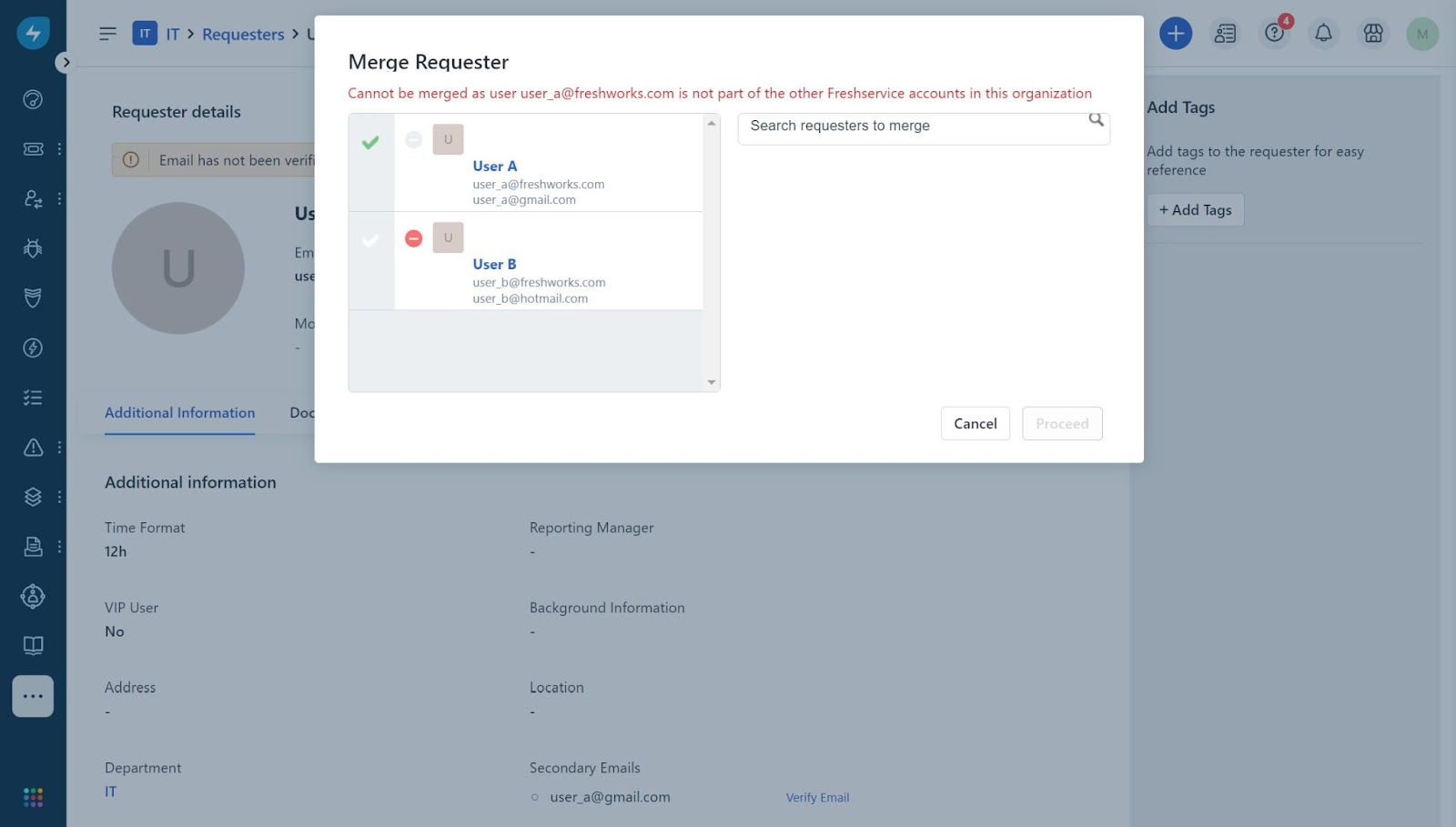
Result: User A’s and B’s profiles will be retained as is in the respective Freshservice instances and the Freshworks organization without any changes.
SCENARIO 6: Merge two users across two Freshservice instances where:
| Freshworks Organization (Neo Admin Center) | Freshservice Instance | BEFORE MERGING THE USERS | AFTER ATTEMPTING TO MERGE USER B INTO USER A | ||
| Users, their License Type, and User Status | Primary Email | Secondary Email | |||
| Explorer360 | Freshservice\_Instance\_1 | User A (Requester)<br>Activated | User\_A@freshworks.com | User\_A@gmail.com | The merge action cannot be achieved in this scenario as User A is deactivated in one of the Freshservice instances. Hence, the users will be retained as is without any changes. |
| User B (Requester)<br>Activated | User\_B@freshworks.com | User\_B@hotmail.com | |||
| Freshservice\_Instance\_2 | User A (Requester)<br>Deactivated | User\_A@freshworks.com | User\_A@gmail.com | ||
| User B (Requester)<br>Activated | User\_B@freshworks.com | User\_B@hotmail.com |
Merge Action: The administrator initiates a merge of User B into User A from User A’s profile in Freshservice\_Instance\_1.
Expected Behavior: The merge action will not be allowed because if merging is allowed, User B will get deactivated in Freshservice\_Instance\_2, thus causing them to lose access to that Freshservice account. The below error is seen.
“Cannot be merged as user user\_a@freshworks.com is deactivated in other Freshservice accounts in this organization”
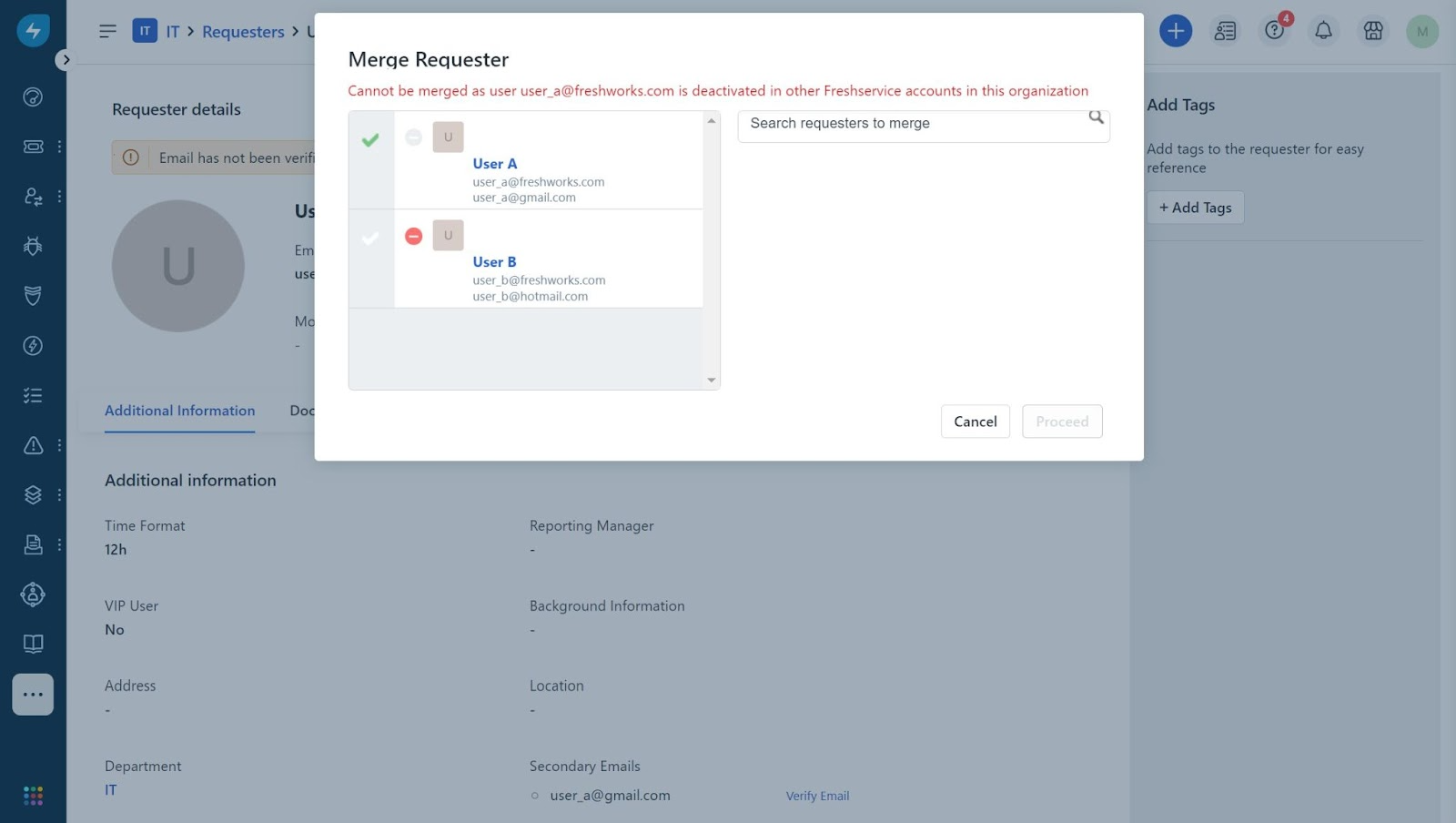
Result: User A’s and B’s profiles will be retained as is in the respective Freshservice instances and the Freshworks organization without any changes.
Merging Users Between Freshservice and Other Freshworks Products in the Same Freshworks Organization
SCENARIO 7: Merge two users across a Freshservice instance and another Freshworks product where:
| Freshworks Organization (Neo Admin Center) | Freshservice & Freshdesk\\CSS Instances | BEFORE MERGING THE USERS | AFTER ATTEMPTING TO MERGE USER B INTO USER A | ||
| Users<br>(& Their License Type) | Primary Email | Secondary Email | |||
| Explorer360 | Freshservice\_Instance\_1 | User A (Requester) | User\_A@freshworks.com | User\_A@gmail.com | The merge action cannot be achieved in this scenario as Users A & B are agents in the Freshdesk instance while having requester access in the Freshservice instance. Hence, the users will be retained as is without any changes. |
| User B (Requester) | User\_B@freshworks.com | User\_B@hotmail.com | |||
| Freshdesk\_CSS\_Instance\_1 | User A (Agent) | User\_A@freshworks.com | N/A | ||
| User B (Agent) | User\_B@freshworks.com | N/A |
Merge Action: The administrator initiates a merge of User B into User A from User A’s profile in Freshservice\_Instance\_1.
Expected Behavior: The merge action cannot be achieved because if merging is allowed, User B, who exists as an agent in Freshdesk\_CSS\_Instance\_1, will lose agent access. The below error is displayed when this merge scenario occurs.
“Cannot be merged as user user\_b@freshworks.com is part of another Freshworks product.”
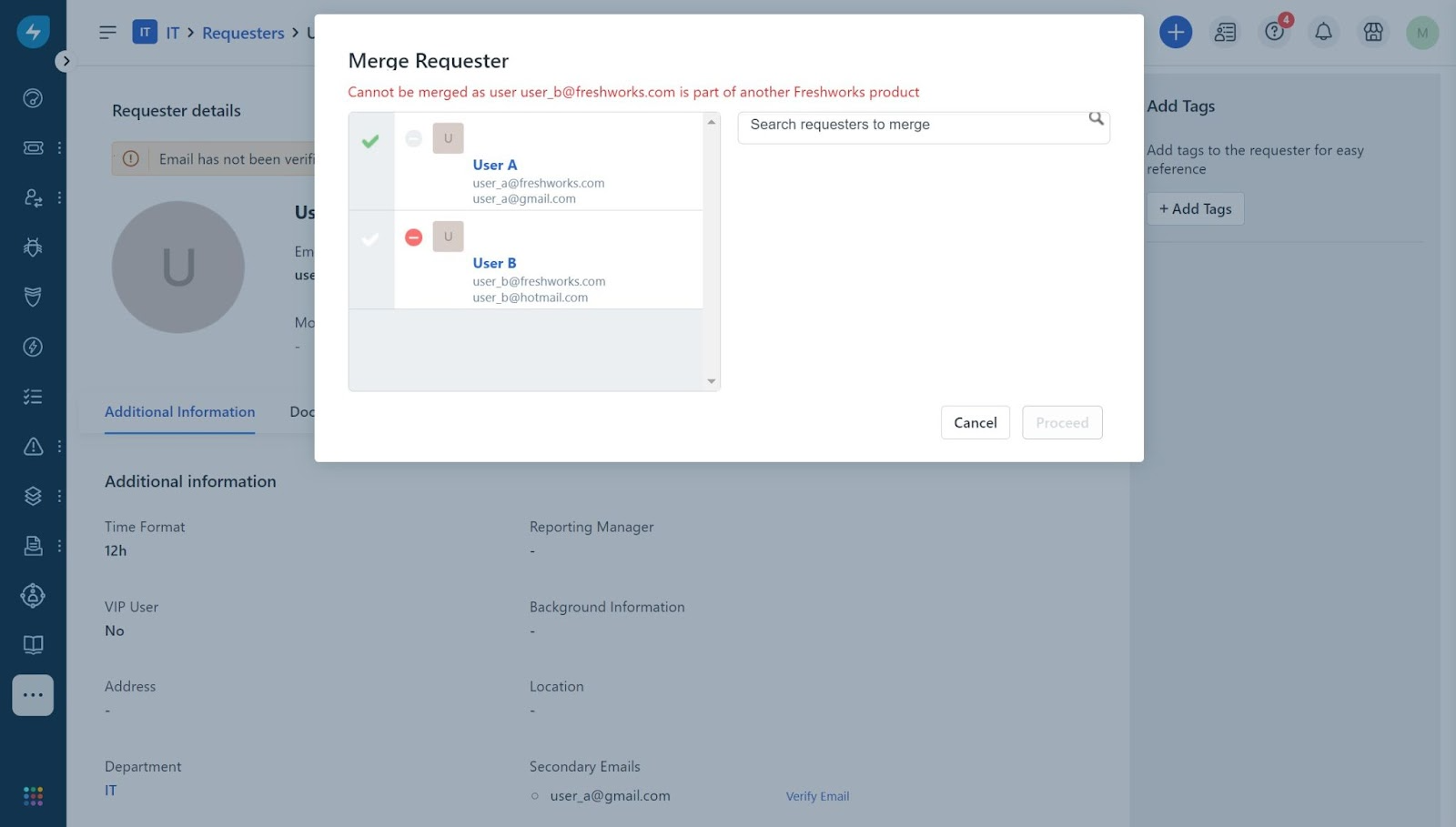
Result: User A’s and B’s profiles will be retained as they are in the Freshservice, Freshdesk/CSS, and Freshworks organizations without any changes.
SCENARIO 8: Merge two users across a Freshservice instance and other Freshworks products containing:
| Freshworks Organization (Neo Admin Center) | Freshservice & Freshdesk\\CSS Instances | BEFORE MERGING THE USERS | ||
| Users<br>(& Their License Type) | Primary Email | Secondary Email | ||
| Explorer360 | Freshservice\_Instance\_1 | User A<br>(Requester) | User\_A@freshworks.com | User\_A@gmail.com |
| User B<br>(Requester) | User\_B@freshworks.com | User\_B@hotmail.com | ||
| Freshdesk\_CSS\_Instance\_1 | User A (Agent) | User\_A@freshworks.com | N/A |
| AFTER MERGING USER B INTO USER A | ||
| Requesters | Primary Email | Secondary Email |
| User A<br>(Requester) | User\_A@freshworks.com | - User\_A@gmail.com<br> <br>- User\_B@freshworks.com<br> <br>- User\_B@hotmail.com |
| User A (Agent) | User\_A@freshworks.com | N/A |
Merge Action: The administrator initiates a merge of User B into User A from User A’s profile in Freshservice\_Instance\_1.
Expected Behavior: The profiles of both users will be consolidated as one profile.
Result:
SCENARIO 9: Merge two users across two Freshworks products containing:
| Freshworks Organization (Neo Admin Center) | Freshservice & Freshdesk\\CSS Instances | BEFORE MERGING THE USERS | AFTER ATTEMPTING TO MERGE USER A INTO USER B | ||
| Users<br>(& Their License Type) | Primary Email | Secondary Email | |||
| Explorer360 | Freshservice\_Instance\_1 | User A<br>(Requester) | User\_A@freshworks.com | User\_A@gmail.com | The merge action cannot be achieved in this scenario as User A is also an agent in Freshdesk. Merging User A into User B will remove User A’s profile from the Neo Admin center and the Freshdesk instance. <br>Hence, the users will be retained as is without any changes. |
| User B<br>(Requester) | User\_B@freshworks.com | User\_B@hotmail.com | |||
| Freshdesk\_CSS\_Instance\_1 | User A (Agent) | User\_A@freshworks.com | N/A (Agent) |
Merge Action: The administrator initiates a merge of User A into User B from User B’s profile in Freshservice\_Instance\_1.
Expected Behavior: The merge action cannot be achieved, and the error below is seen.
“Cannot be merged as user user\_a@freshworks.com is part of another Freshworks product.”
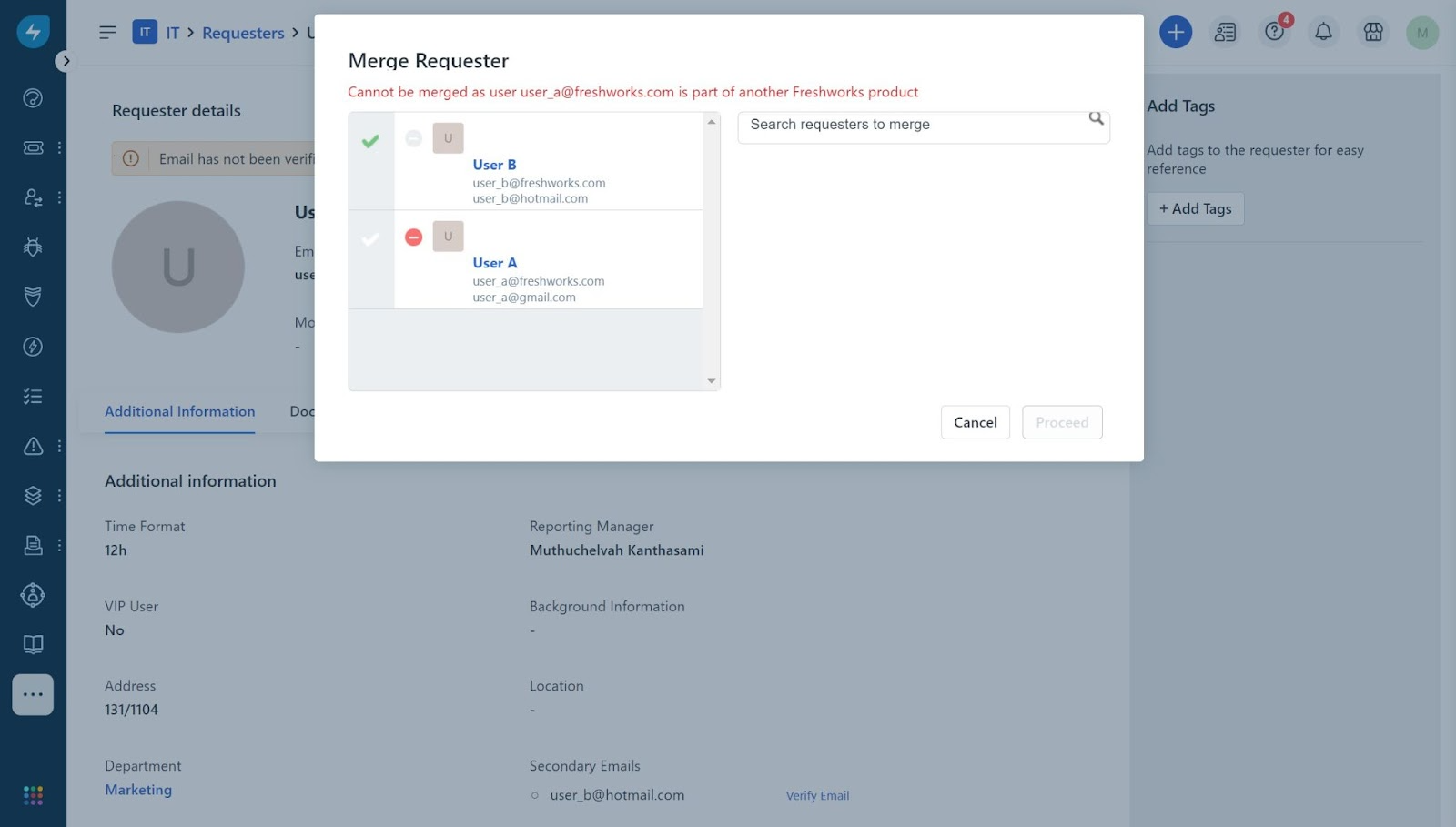
Result: User A’s and B’s profiles will be retained as they are in the Freshservice, Freshdesk/CSS, and Freshworks organizations without any changes.
Frequently Asked Questions (FAQs):
1. Is there a limit to the number of primary and secondary email IDs a requester can have?
- A requester can have one primary email-id and up to four secondary email-ids.
2. Is there a limit to the number of requesters that can be merged together?
- You can merge up to four requesters into another requester, provided none of them have secondary email IDs. In this case:
3. If I merge requesters from one Freshservice instance, what will be the impact on all other instances?
- After merging, the consolidated requester profile will be the only active profile across all Freshservice instances and the Freshworks Organization.
4. What other changes will occur to the user profiles post merging?
- All the tickets, problems, changes, releases, approvals, tags, etc. are moved to the primary requester (User A).
- If a ticket is raised through an email from a secondary email ID, then all agent replies will go to the secondary email. But the requester on the ticket will be the primary one.
- All of the secondary requesters' departments, groups, and CABs will be moved to the primary one.
- The email ID that was verified first will become primary.
- The email, first name, last name, timezone, language, time format, and mark as VIP fields values of the primary user are retailed during merging. If the values of title, work phone, mobile phone, Can see all tickets from this department, Can see all changes from this department, reporting manager, address, location and background information are blank for the primary user then they are copied from the secondary requesters profile. For departments, the departments of all users i.e. primary and secondary are merged and retained.