Last updated: 2026-02-18
How to avoid email replies from creating duplicate tickets in Freshservice
Freshservice performs the following two checks to decide if an email reply should be created as a new ticket or threaded to an existing ticket.
1. Email Marker Check 2. Requester Check
Email Marker Check
Freshservice uses three email markers to match an email reply with an existing ticket.
1. Ticket ID,
2. Message ID and
3. Freshservice unique ticket identifier.
If there is a match, the incoming email is threaded into the ongoing ticket conversation, thus preventing ticket duplicates.
Here’s how you can do it.
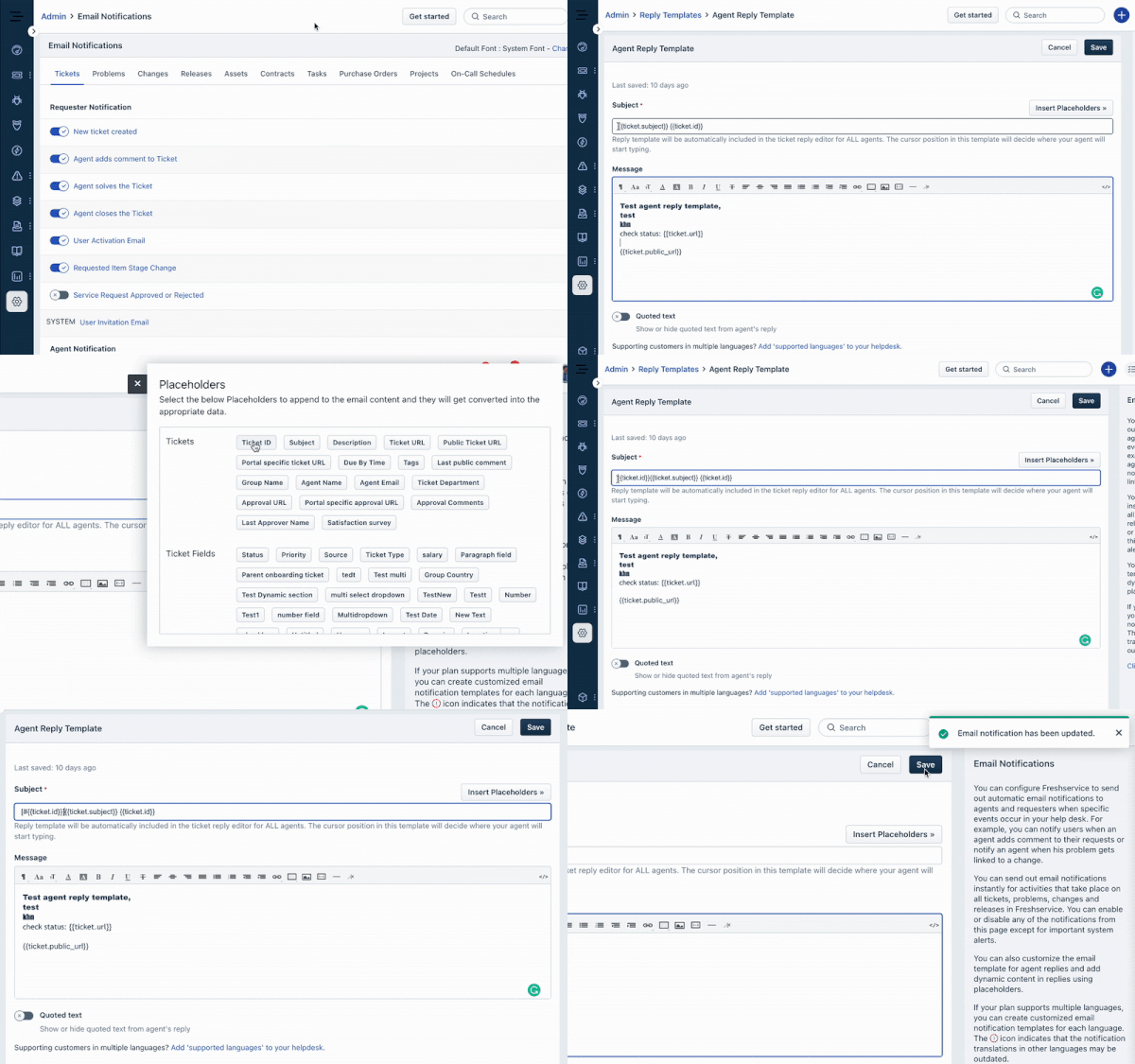
1. Navigate to Admin. Under the AccountSettings section, select the EmailNotifications option.
2. Click on the Tickets module and select the Agent Reply Template under Replytemplates.
3. Place your cursor on the Subject field and click on the Insert Placeholders button.
4. Click on the Ticket ID option and make sure to add the symbol # before the ticket ID in this format \[#{{ticket.id}}\]
5. Once done, click on Save.
Requester Check
Freshservice now performs a check for the sender to thread the reply to the existing conversation. The sender's email should be one of the following:
1. Requester email address of the ticket
2. Agent email address of the ticket
3. Email address in the CC of the ticket
4. Forwarding email address
5. Requester email belongs to the same company
6. Requester email is added to the approver's list
7. Requester email domain is added to the email threading domains of the account (domain filter).
Freshservice will append the email response to an existing ticket only when an email reply satisfies one of the Email Marker Checks and one of the Requester Checks.
If the issue persists, please reach out to support@freshservice.com, and one of our Support Specialists will help resolve the issue.