Last updated: 2024-12-02
Installing Discovery Agent \[Windows\]
The Freshservice Discovery Agent can be installed on your Windows machines. The Discovery Agent then collects the machines' hardware and software information and updates Freshservice regularly without the need for further intervention from the respective users.
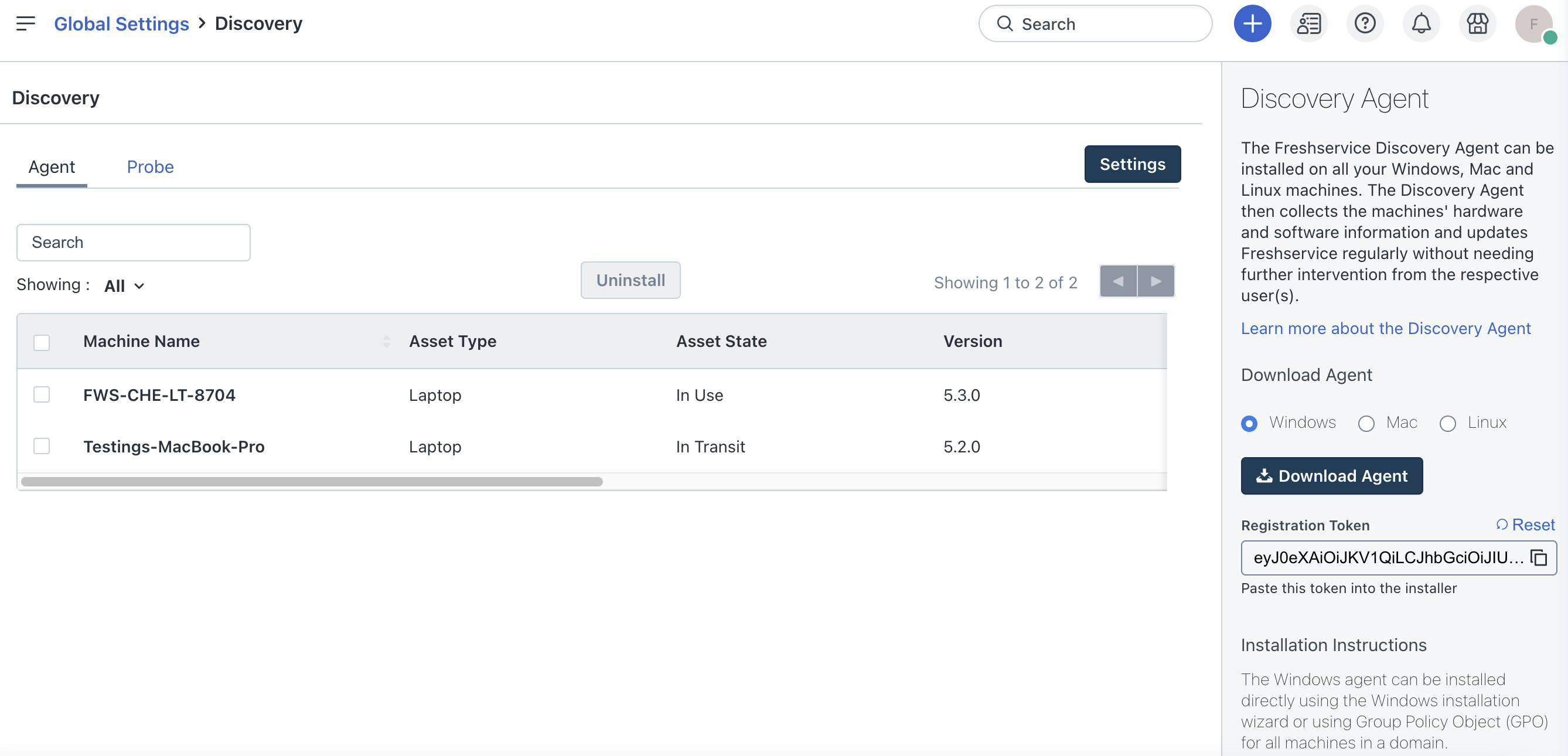
To install the Discovery Agent:
1. Go to Admin > Global Settings > Asset Management > Discovery Hub. 2. Click Configure Agent and Probe in the Basic discovery section. 3. In the Download Agent section of the Agent tab, select Windows and click Download Agent. 4. Copy the registration token, which will be used in the installation process.
Note:
a) This is applicable for Windows Agent version 3.5.0 and above.
b) The registration token is unique to your Freshservice account and not bound to any specific Discovery Agent.
5. Once the download is complete, double-click the downloaded .msifileto launch the installer.
6. Follow the on-screen instructions and paste the registration token to complete the installation process.

The installation path for Freshservice Discovery Agent isC:\\Program Files (x86)\\Freshdesk\\Freshservice Discovery Agent
If your organization has a Proxy configured, follow these steps to install the Freshservice Discovery Agent:
1. Download the Agent file for Windows.
2. Open the command prompt and execute the following command:
msiexec /i <agent installer> REGISTRATIONTOKEN="dummytoken" PROXYSERVER=<proxy server name/ip> PROXYPORT=<proxy port> PROXYUSERNAME=<proxy user name> PROXYPASSWORD=<proxy password>
Example:
msiexec /i "fs-windows-agent.msi" /qn /norestart ACTION=INSTALL ALLUSERS=1 TARGETDIR="C:\\Program Files (x86)\\Freshdesk\\Freshservice Discovery Agent\\" REGISTRATIONTOKEN="dummytoken" PROXYSERVER=192.168.5.161 PROXYPORT=808 PROXYUSERNAME=admin PROXYPASSWORD=freshservice
``` Note: PROXYUSERNAME and PROXYPASSWORD are optional. ```
Discovery Agent silent installation via command:
```html
```
HTML
_More information on the Agent (supported OS, prerequisites, and download instructions) can be found here._
_To install the Discovery Agent on computers in a workgroup, use the PSExec tool._
_To install the Discovery Agent on computers in a domain, use GPO._