Last updated: 2026-04-10
Freddy AI Insights for Freshservice
1\. How do I enable Freddy AI Insights?
Follow the steps below to enable Freddy AI Insights:
2\. Who is Freddy AI Insights for?
Freddy AI Insights is essentially for supporting supervisors and decision-makers. With AI-powered conversational inquiries and auto-generated insights, they can gain visibility into IT performance.
3\. What languages are Freddy AI Insights available in?
Freddy AI Insights is available only in English at the moment. The Multilingual Insights feature is in our product roadmap.
4\. Can we export reports from Freddy AI Insights?
This is not supported at the moment.
5\. What are the types of insights available?
| Insight Type | Description | Example |
| Majority | Highlights the maximum/dominant/majority value associated with a particular metric or group-by. | 80% of the ITOps team’s SLA violated Tickets are from the Hardware Category. |
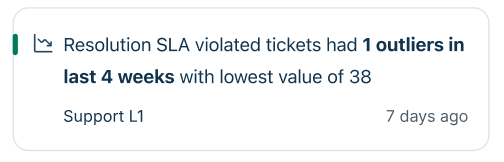
| Outliers | Detects a metric value when it is unusually large or small in a given time frame. | Two anomalies were observed in the ITOps Average Resolution Time. The largest value of 1hr:2mins was observed in the week of January 1. |
| Trend Change<br>(Spike & Fall) | Spot any increase or decrease in any metric in a time period. | A 15% spike was observed in the ITOps Average Resolution Time in the week of January 15, 2025. |
| Recent Change | Compares the most recent data point to the previous one for any given time period. | Last week, the ITOps Average Resolution Time was 27% lower compared to its previous week. |
| Overall Trend | Tracks the upward or downward movement of a metric in the given time period. | 22% increase in ITOPs Average Resolution Time observed in the last 12 weeks. |
| Longest Increase/Decrease | Finds sustained growth or drop periods in metrics. | ITOps Tickets saw the longest period of increase, 17%, from the week of January 5 to February 7. |
6\. Why am I unable to find any insights?
The following conditions need to be met for insights generation:
7\. What duplication checks are done for various types of insights generated?
8\. At what aggregation level does Freddy AI generate insights?
Freddy AI Insights are generated at an Agent Group level at the moment.
9\. For which modules does Freddy AI generate insights?
At the moment, AI Insights are generated only for the ‘Tickets’ module.
10\. How frequently will Freddy AI generate insights (Proactive Insights and RCA) for my account?
| Refresh Frequency | Time period we look back on | Minimum number of days with data to be active or present | Availability |
| Weekly | 12 weeks | 6 weeks | Every Monday |
| Monthly | 1 year | 6 Months | On the first day of every month |
Note: Root Cause Analysis (RCA) is pre-computed, and data points may vary with the current number (based on the above refresh frequency).
11\. Can I customize the insights that Freddy AI generates in my account?
Yes, click here for more details.
12\. Are the AI Insight report formats customizable?
At the moment, this is not available, but it is on our roadmap.
13\. Will AI Insights consider data migrated from other systems for Proactive Insights and RCA?
Yes, data migration from other systems is considered when generating AI Insights. However, we need to ensure two things:
14\. Are notifications available on email/Slack/Microsoft Teams when an insight is generated?
Not at the moment, but this is on our roadmap.
15\. Will Freddy AI Insights be available to customers in all regions?
Yes.
Root Cause Analysis (RCA)
16\. Explain the frequently used terms for Root Cause Analysis (RCA).
17\. Where can I view RCA?
RCA can be accessed from the Freddy AI module in the product.
18\. Is RCA applicable to all types of insights?
At the moment, RCA is generated for only Proactive Insights, which display a trend that is not beneficial or desirable for the service desk (can also be called negative insights).
19\. What are negative insights?
Insights where the concerned metric has moved in the undesired direction. They are shown in Red, Amber and Yellow colours as per criticality.
20\. What are positive insights?
Insights where the concerned metric has moved in the desired direction. These are shown in green colour. RCA is not available for positive insights.
21\. What timeframe is used to create the RCA for an insight?
This depends on the type of insight as follows:
| Insight Type | Lookback Period | Minimum weeks/months with tickets present for insight to be generated |
| Majority | Last 12 weeks | NA |
| Outliers | Last 12 weeks for weekly<br>Last 12 months for monthly | 6 weeks for weekly<br>6 months for monthly |
| Trend Change<br>(Spike & Fall) | Last 12 weeks for weekly<br>Last 12 months for monthly | 6 weeks for weekly<br>6 months for monthly |
| Longest Increase/Decrease | Last 12 weeks for weekly<br>Last 12 months for monthly | 6 weeks for weekly<br>6 months for monthly |
| Recent Change | Last 2 weeks for weekly<br>Last 2 months for monthly | 6 weeks for weekly<br>6 months for monthly |
| Overall Trend | Last 12 weeks for weekly<br>Last 12 months for monthly | 6 weeks for weekly<br>6 months for monthly |
22\. What types of fields and metrics is RCA applicable to?
| Type | Applicable | Out of scope |
| Fields | Default & Custom fields | Custom Attributes |
| Metrics | Default metrics | Custom Metrics |
23\. What do the terms “unknown” and “others” mean in RCA?
24\. What tickets are part of the Leading Causes underlying data?
All the tickets present in the leaf node (last node) of the critical path of the tree map.
25\. What tickets are part of the View all causes underlying data?
All the tickets for that relevant week or month for which the insight is generated.
26\. Can I add or edit any particular field in the treemap for RCA?
No, at the moment only the fields identified by the AI model are part of the treemap.
27\. Does RCA support multiple languages?
No, at the moment it does not support multiple languages. The Multilingual Insights feature is in our product roadmap.
28\. How does the RCA algorithm work?
Conversational Insights (Freshservice)
29\. What is Conversational Insights?
Conversational Insights lets you ask questions in plain English and instantly get visual reports or charts from your Freshservice data. You don’t need to create reports manually—it’s as simple as chatting with Freddy.
30\. When is Conversational Insights available?
Conversational Insights is Generally Available (GA) for all eligible accounts as of May 14, 2026.
31\. Who can access Conversational Insights?
The feature is available to customers on the Freshservice Enterprise Plan who have Freddy AI Insights enabled.
32\. How do I enable it for my account?
Go to Admin → Freddy AI → Freddy AI Insights and turn on Proactive Insights.
33\. How do I give agents access?
Admins can go to Admin Settings → User Management → Edit Permissions and add the Freddy Insights permission for selected agents.
34\. Where can I find Conversational Insights in Freshservice?
Click the Freddy icon in the Freshservice menu and open the Conversational Insights tab to start asking questions.
35\. How do I use it?
Simply type a question like:
“Show unresolved tickets by priority.”
Freddy will generate the right chart for you. You can refine your query with follow-ups like:
“Only for the last 30 days.”
36\. Can I add these charts to my Analytics reports?
Yes. Click Add to Report on any chart you want to include in your report.
37\. Does it remember my previous questions?
Yes. Conversational Insights keeps your chat history as context for follow-up questions. To start fresh, click Clear Conversation.
38\. Can I see how the chart was created?
Yes. Click the info (i) icon on the chart to view the exact query Freddy used.
39\. What kind of questions work best?
Ask simple, direct questions about what, when, or who—for example, counts, trends, or comparisons. Avoid long or complex questions; instead, break them into smaller follow-ups.
40\. Does it explain “why” something changed?
Not yet. Conversational Insights focuses on descriptive charts. For deeper analysis on why something changed, use Root Cause Analysis (RCA) in Freddy AI Insights.
41\. Which languages does it support?
Currently, it supports English only.
42\. Can it use data outside Freshservice?
No. It only analyzes data within Freshservice.
43\. How accurate are the results?
Accuracy depends on the quality and completeness of your Freshservice data. Freddy may occasionally make mistakes, so always review results before taking action.
44\. Any tips for getting better answers?
45\. What are some example prompts I can try?
46\. What if I enabled Freddy AI Insights after May 24, 2026?
You’ll get access to Conversational Insights within 24 hours of enabling Freddy AI Insights.
Conversational Insights - Service limits
47\. What is the query limit for Conversational Insights?
Conversational Insights has a monthly service limit of 100 queries per account.
48\. What is a service limit?
A service limit is a threshold that is not technically enforced. It provides a benchmark to help you evaluate the service while maintaining full access to all features.
49\. What happens if the account exceeds the 100-query limit?
If you exceed the limit, the following conditions apply:
50\. How do I track my query usage?
Because the limit is not enforced, there are currently no in-product indicators or counters in the UI. You can continue to use the service without monitoring query counts.
51\. Why is there a limit if it is not enforced?
The service limit helps you understand the intended service capacity while allowing you to explore the tool without friction during the early stages of adoption.
General Availability (GA)
52\. When is Freddy AI Insights going live in GA?
Freddy AI Insights went GA on June 11, 2025. The specific Conversational Insights capability within that suite will go GA on May 14, 2026.
53\. Which plans will have access to Freddy AI Insights at GA?
Freddy AI Insights is available only to customers on the Freshservice Enterprise plan.
54\. I am on the Freshservice Pro plan and have been testing Freddy AI Insights in public beta. Is there any action for me?
Please upgrade to the Freshservice Enterprise plan to continue using Freddy AI Insights.
Related links: