Last updated: 2019-09-13
With the Freshservice-SCCM Integration, you can sync your Hardware, Software inventory and User information available in SCCM with the Freshservice.
SCCM is integrated with Freshservice using the Discovery Probe.
You can download Discovery Probe from your Freshservice account. While setting up Probe, you’ll need to choose the configuration type for it. Select SCCM Integration and click Next. The Probe will now automatically authenticate to Freshservice.

Upon successfully authenticating the Probe withFreshservice, you can connect to SCCM using either the SQL credentials or Windows Credentials. Enter the SQL Server Name, Port, Database Name and Instance Name where the SCCM device and user info is available.
You have two options to authenticate to SCCM.
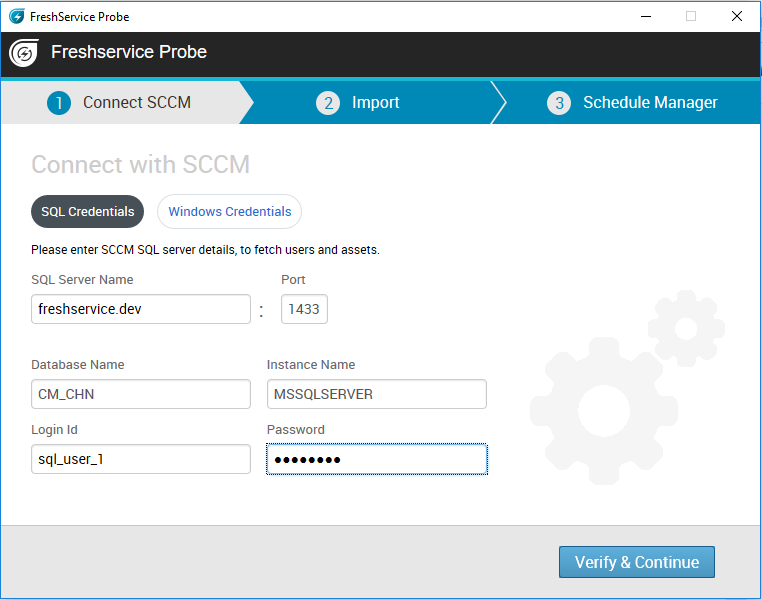
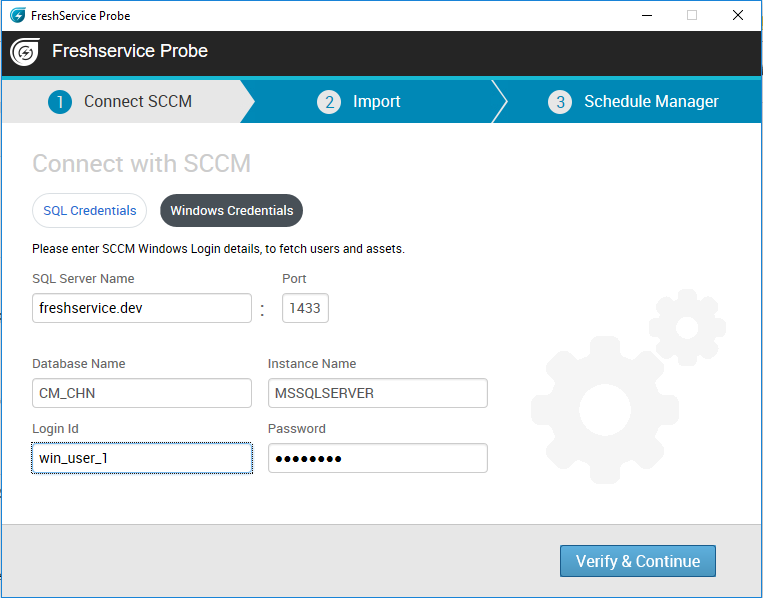
The SQL Server connection will be verified before saving it. In case the details are incorrect, the Probe will display an error message as shown below.
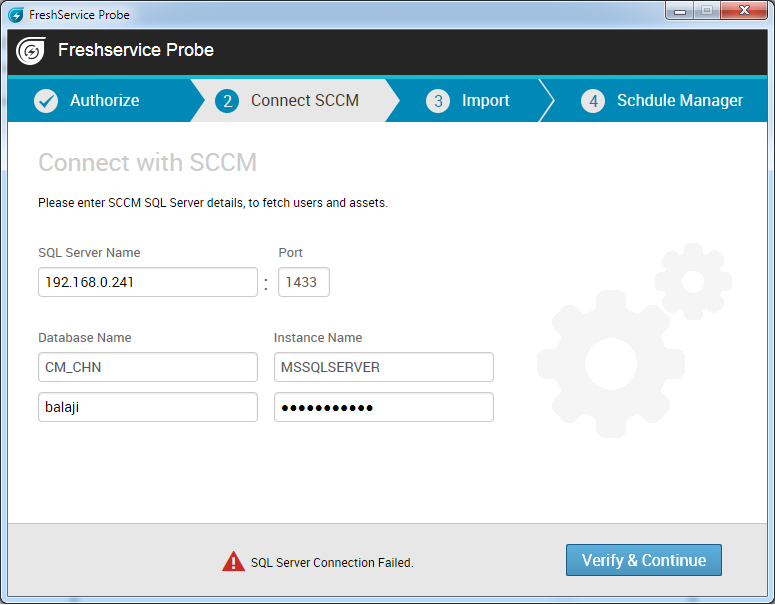
On the Import screen, you can choose to import Users, Assets or both. If you do not want to import the lists immediately, you can skip to the next step.

You can use the Schedule Manager screen to schedule automatic SCCM imports.

Once the wizard is configured, you’ll be taken to the landing screen where imported users and assets will be listed.
The Import Users and Import Assets buttons will facilitate immediate import. On clicking the import buttons, a loader will be displayed until the corresponding entities are imported.
If the SQL Server configuration changes by any chance, you will be prompted to verify it before starting the next import.

The SQL Server details can be changed later by going to Settings → SCCM Settings. You can configure and verify the SQL connection and then import users and assets without problems.
You can use the Settings tab for the import Schedule, Probe Info and SCCM settings.
Points to note
SCCM - SQL Server
Views and columns used for synchronizing Freshservice
v\_GS\_SYSTEM
| Column name in the Table | Can be used as |
| ResourceID | Device Identifier |
| Domain0 | Device domain |
| Name0 | Host Name |
| SMSID0 | Guid identifier of the device |
v\_GS\_COMPUTER\_SYSTEM
| Column name in the Table | Can be used as |
| ResourceID | Device Identifier |
| Manufacturer0 | Device Manufacturer(Vendor) |
| Model0 | Model of the Device (Product) |
| UserName0 | User Name |
| Domain0 | Domain of the device |
v\_GS\_COMPUTER\_SYSTEM\_PRODUCT
| Column name in the Table | Can be used as |
| ResourceID | Device Identifier |
| UUID0 | UUID |
| Version0 | Used as Product for Lenevo kind of Manufacturers |
v\_GS\_OPERATING\_SYSTEM
| Column name in the Table | Can be used as |
| ResourceID | Device Identifier |
| Caption0 | OS Name |
| CSDVersion0 | OS Pack |
| InstallDate0 | OS Install Date |
| Manufacturer0 | OS Manufacturer |
| Name0 | Name |
| SystemDirectory0 | System Directory |
| TotalVirtualMemorySize0 | Virtual Memory |
| TotalVisibleMemorySize0 | Ram |
| Version0 | Version |
| WindowsDirectory0 | Install directory |
v\_GS\_SYSTEM\_ENCLOSURE
| Column name in the Table | Can be used as |
| ResourceID | Device Identifier |
| ChassisTypes0 | Currently used to identify asset/CI Type in Probe and Agent |
| SerialNumber0 | Bios Service Tag(Serial Number) |
| SMBIOSAssetTag0 | Asset Tag |
v\_GS\_PC\_BIOS
| Column name in the Table | Can be used as |
| ResourceID | Device Identifier |
| SerialNumber0 | Bios Service Tag(Serial Number) |
| Version0 | Version of BIOS |
v\_GS\_WORKSTATION\_STATUS
| Column name in the Table | Can be used as |
| ResourceID | Device Identifier |
| LastHWScan | Last Scan Time by SCCM |
v\_GS\_NETWORK\_ADAPTER\_CONFIGURATION
| Column name in the Table | Can be used as |
| ResourceID | Device Identifier |
| DHCPEnabled0 | DHCP Enabled Value |
| IPAddress0 | IPV4 and IPv6 Address. |
| MACAddress0 | Mac Address of the Adapter |
| IPEnabled0 | IP Enabled Flag |
v\_GS\_ADD\_REMOVE\_PROGRAMS
In this table 32 bit applications Info can be collected.
| Column name in the Table | Can be used as |
| ResourceID | Device Identifier |
| DisplayName0 | Display Name of the Software |
| InstallDate0 | Install Date of Appliciation |
| ProdID0 | Product Id of Application |
| Publisher0 | Publisher of the Application |
| Version0 | Version of Software |
v\_GS\_ADD\_REMOVE\_PROGRAMS\_64
64 Bit Application Details
| Column name in the Table | Can be used as |
| ResourceID | Device Identifier |
| DisplayName0 | Display Name of the Software |
| InstallDate0 | Install Date of Appliciation |
| ProdID0 | Product Id of Application |
| Publisher0 | Publisher of the Application |
| Version0 | Version of Software |
v\_GS\_LOGICAL\_DISK
Drive related details for components
| Column name in the Table | Can be used as |
| ResourceID | Device Identifier |
| Description0 | Disk Description |
| DeviceID0 | Drive Name |
| DriveType0 | Drive Type (Removable/Local) |
| FileSystem0 | File System of Drive (NTFS/extFat) |
| Name0 | Drive Name |
| Size0 | Drive Size |
| FreeSpace0 | Drive Free Space |
v\_GS\_NETWORK\_ADAPTER
| Column name in the Table | Can be used as |
| ResourceID | Device Identifier |
| AdapterType0 | Adapter Type |
| Description0 | Description of Adapter (name) |
| MACAddress0 | Mac Address of Network Adapter |
| Name0 | Name of Adapter |
| NetworkAddresses0 | <No Comments>Null in my DB |
| PermanentAddress0 | <No Comments>Null in my DB |
v\_GS\_PHYSICAL\_MEMORY
| Column name in the Table | Can be used as |
| ResourceID | Device Identifier |
| BankLabel0 | Memory Bank label |
| Caption0 | Caption |
| DeviceLocator0 | Bank Locator |
| MemoryType0 | Memory type |
| Speed0 | Speed |
v\_GS\_PROCESSOR
| Column name in the Table | Can be used as |
| ResourceID | Device Identifier |
| Manufacturer0 | Processor Manufacturer |
| Name0 | Model |
| NumberOfCores0 | Cores |
| MaxClockSpeed0 | Speed of the Processor |
v\_R\_User
| Column name in the Table | Can be used as |
| ResourceID | User Identifier |
| User\_Name0 | sAMAccountName |
| Full\_User\_Name0 | name |
| Mail0 | |
| Windows\_NT\_Domain0 | Domain |
| Object\_GUID0 | Object GUID |