Last updated: 2025-04-22
Cloud compute assets like Azure VM are discovered from multiple sources, such as Probe, Agent, and Cloud application integrations. To maintain a single record for every discovered Cloud compute asset and avoid duplication, we will gradually migrate the Cloud compute assets for existing customers under the new Hardware asset sub-types irrespective of the discovery sources.
Overall, deprecating the Cloud compute asset type and standardizing with the Hardware asset type will provide several benefits, such as unified asset management, improved data accuracy, enhanced reporting and analytics, greater workflow reliability, and simplified asset reconciliation.
_Note:__The data migration process for existing customers using the deprecated Cloud compute asset types will be initiated after a support ticket is raised by the customer. See What should you do? section below for more information._
What will change after this deprecation?
To support a standard asset type classification, we will introduce new asset sub-types under the Hardware asset type for the assets discovered via cloud management applications.
All Cloudcompute asset types and associated sub-types will be mapped under the Hardware asset type and its new associated sub-types. The following table provides the mapping details:
| Cloud compute assets (existing mapping) | Hardware assets (new mapping) |
| Cloud - Host | Hardware - Computer-Host |
| Cloud - Host - VMware VCenter Host | Hardware - Computer-Host - VMware Host |
| Cloud - Virtual Machine | Hardware - Computer-Server |
| Cloud - Virtual Machine - VMware VCenter VM | Hardware - Computer-Server - VMware VM |
| Cloud - Virtual Machine - AWS VM | Hardware - Computer-Server - AWS VM |
| Cloud - Virtual Machine - Azure VM | Hardware - Computer-Server - Azure VM |
| Cloud - Virtual Machine - GCP VM | Hardware - Computer-Server - GCP VM |
| Cloud - K8s Node | Hardware - Computer-Server - K8s Node |
| Cloud - K8s Node - AWS K8s Node | Hardware - Computer-Server - K8s Node - AWS K8s Node |
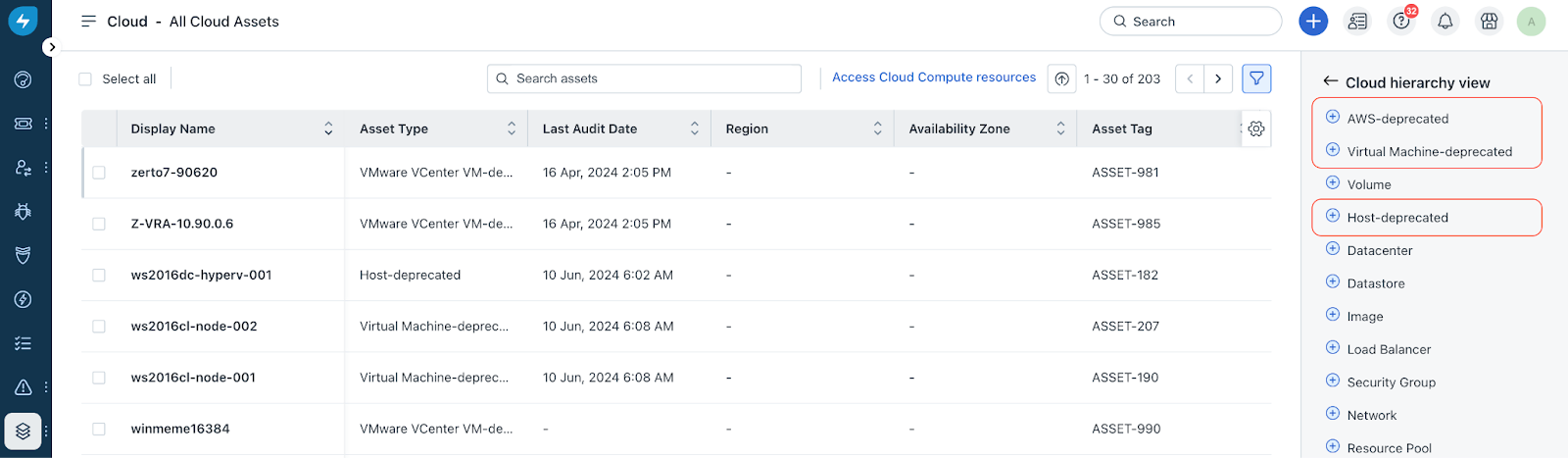
_(Post deprecation)_To verify Cloud compute asset types (from the above list) are deprecated:
1\. Go to Assets > Cloud.
2\. Click the Filter icon. Then, click the Hierarchy View icon under Asset Type.
3\. Verify that the following Cloud asset types show ‘deprecated’ status.
How do I know if this deprecation impacts me?
This deprecation will impact customers subscribed to _Basic Discovery_ who match the following conditions:
_Note:_ _Customers subscribed to Advanced Discovery (powered by Device42)__are not impacted._
What is the impact of this deprecation?
As part of the deprecation process and mapping of all Cloudcompute asset types to their respective Hardware asset types, there will be an impact on the following application-related features:
Assets discovered:All the discovered Cloud compute assets will be automatically mapped to the new Hardware asset sub-types.
Workflows:
Default and custom fields: For every asset previously discovered with the deprecated Cloud compute asset types, you will need to re-configure all the default and custom fields for the updated asset type.
Curated and custom reports: You will need to re-configure all the curated and custom reports related to the deprecatedCloudcompute asset types based on the updated asset type.
_Important:_ _Post deprecation, you must create new reports for any Custom reports that reference the deprecated Cloud compute_ _asset types. You should take a backup of each asset type with the export option._
Associations related to assets: For every asset previously discovered with the deprecated Cloud compute asset types, all the associations related to each asset will be retained.
What should you do?
Before data migration:
After data migration:
For any queries, reach out to us at support@freshservice.com.