scaly
Knowledge base Submit a ticket
  • Swedish
  • English
Getting started with Freshservice
  • Freshservice Onboarding Flow
  • List of Dynamic Placeholders
  • Multi-language support for Freshservice
  • Add Agents to Freshservice
  • Freshservice System Requirements
  • Customize your service desk to have your name & theme | Freshservice Rebranding
  • Configuring self service in your support portal | Freshservice Service Desk
  • Setting up a custom domain for your service desk | Freshservice Rebranding
  • Configure custom SSL for your service desk | Freshservice Rebranding
  • Requesting Changes
  • Getting started with FreshThemes
  • Portal layout basics
  • What is Handlebars JS?
  • Palettes and Hex Codes
  • Defining Full-time Vs. Occasional Agents in your Service Desk | Freshservice Solutions
  • Partials and Placeholders
  • Setting up a Password policy in Freshservice
  • Adding Custom Fields for Requesters in Freshservice
  • Adding requesters into your service desk | Freshservice Solutions
  • Bulk import requesters into your service desk | Freshservice Solutions
  • Remote authentication of users using Active Directory | Freshservice
  • Setting up Microsoft Azure AD Single Sign-on in Freshservice
  • Finding the SHA-256 fingerprint from your Identity Provider (Azure, Okta and Onelogin)
  • Configure Active Directory SSO With JSON Web Token
  • Customizing the New Ticket form | Freshservice Field Templates
  • Create multi-level or dependant ticket fields in your Service Desk | Freshservice
  • Adding dependent fields in ticket form | Freshservice Field Templates
  • Know the Field Types in your service desk | Freshservice Field Templates
  • Adding custom ticket statuses in your service desk | Freshservice Field Templates
  • Scheduling and posting announcements in Freshservice
Support Guide
  • Viewing ticket information in your service desk | Freshservice Solutions
  • Checking recent helpdesk activity in your service desk | Freshservice Solutions
  • Create email templates for your service desk | Freshservice Canned Responses
  • Modify ticket fields in your service desk | Freshservice Ticket Properties
  • Knowing the ticket statuses in your service desk | Freshservice Ticket Properties
  • Add existing solutions to ticket responses | Freshservice Incident Management
  • Add time entries to tickets, problems, changes & releases | Freshservice Service Desk
  • Service Desk Efficiency - Using keyboard shortcuts | Freshservice
  • Adding Child Tickets to Incidents in Freshservice
  • Using canned responses in tickets | Freshservice Ticket Management
  • Set time/event based rules in your service desk | Freshservice Supervisor
  • Complete a set of tasks in one click | Freshservice Scenario Automation
  • Auto schedule reminders for routine IT operations | Freshservice Service Desk
  • Execute a set of service desk tasks in one click | Freshservice Scenario Automation
  • Supervisor rules configuration based on custom ticket status
  • Freddy AI Copilot overview
  • Generate reply suggestions for tickets
  • Generate ticket summaries using Freddy AI
  • Use Ticket Field Suggester to categorize tickets
  • Identify similar tickets using Similar Ticket Suggester
  • API actions library in Freshservice
  • Freddy AI Insights for Freshservice
  • Freshservice, AI, Freddy AI Insights, Freshworks
  • Freshservice, AI, Freddy AI Insights, Freshworks
  • Conversational Insights in Freshservice
  • Increase Agent Productivity with Real-Time Custom Dashboards
  • Freddy AI Insights: Frequently Asked Questions (FAQs)
  • Improve Team Alignment with Team Dashboards
  • Team Dashboard is now more inclusive
  • Improve Team Performance with the Freshservice Leaderboard
Freshservice for Business Teams
  • Freshservice for Business Teams (FSBT) – FAQs
  • Introducing Freshservice for Business Teams
  • Ticketing Essentials for Business Teams
  • Modes of Ticket Creation
  • Setting Up and Managing Your Knowledge Base
  • Ticket Troubleshooting
  • Using Analytics in Freshservice for Business Teams
  • Journeys in Freshservice for Business Teams
  • Document Management in Freshservice for Business Teams
  • Get your finance function up and running on Freshservice
  • Make workplace digital using Freshservice for Facilities
  • Get Support: How to onboard HR Teams?
  • Streamline legal service management with Freshservice
  • Streamline Service Delivery for your Supply Chain/Operations Team with Freshservice
  • Get Support: Business Agent add-on license
  • What are the differences between IT agents and Business agents?
  • Detailed list of features accessible to business agents
  • How to convert an existing IT agent to a business agent or vice-versa?
  • How can admins buy business agent licenses?
  • About Freddy Copilot in Freshservice for Business Teams
Enterprise Service Management
  • Building Onboarding Kits
  • Adding Stakeholders to the Onboarding Module
  • Creating Onboarding Tickets
  • Bulk Employee Onboarding in Freshservice
  • Get help with Employee Onboarding - Freshservice Support
  • What is a workspace?
  • What is a ticket type or prefix?
  • Moving data between workspaces: guidelines and restrictions
  • Workspace Views
  • What is a primary workspace?
  • Embed eSignatures in Documents
  • Docusign for e-signatures in documents
  • Document generation for employee requests
  • Manage documents with the centralized list view
IT Asset Management- Classic
  • Looking up CI information in your service desk | Freshservice CI Management
  • Adding a new CI type to your service desk | Freshservice Configuration Items
  • Calculate depreciation of IT Assets | Freshservice
  • Adding a new CI to your service desk | Freshservice CI Management
  • Service Desk Discovery Probe | Freshservice Asset Discovery
  • Installing Freshservice Discovery Agent for Windows
  • Importing Assets
  • IT asset attributes discovered by Discovery Agent and Probe
  • Discover and Manage IT Assets with Freshservice Discovery - Beginner's Guide
  • Managing IT assets with Discovery Hub
  • Installing Freshservice Discovery Agent in a Domain [using GPO]
  • Freshservice Discovery Agent Overview
  • How to install Freshservice Discovery Agent in a Workgroup
  • Installing Freshservice Agent on Mac devices using the Remote Install tool
  • Installing Discovery Probe in your system | Freshservice Asset Discovery
  • How to integrate SCCM with your Freshservice account
  • Discover hardware & software assets in your network | Freshservice Asset Discovery
  • Manage scanned assets in your service desk | Freshservice Asset Discovery
  • SNMP Device Discovery
  • Freshservice Cloud Discovery - Azure Cloud
  • Freshservice Cloud Management - AWS Integration
  • Attach relationships to IT assets in your service desk | Freshservice Solutions
  • Freshservice Cloud Discovery - VMware Vcenter
  • Introduction to Freshservice Cloud Management
  • Get started with Freshservice Cloud Management
  • What are the different types of relationships in Freshservice?
  • Visualize relationships with asset relationship maps
  • Software License Management
  • Managing Software using Software Asset Management
  • Stay on top of Software and SaaS usage with the Analytics Module
IT Operations Management
  • Automatically create alert-based incidents using Alert Rules
  • Alert Management in Freshservice - An Overview
  • Set up alert management in Freshservice
  • Learn all about Automated Grouping in Freshservice
  • Working with alerts in Freshservice Alert Management
  • Integrate SolarWinds NPM with Freshservice Alert Management
  • Integrate New Relic Synthetics with Freshservice Alert Management
  • Integrate Pingdom with Freshservice Alert Management
  • Introducing Orchestration Center
  • Integrate New Relic APM with Freshservice Alert Management
  • Integrate Site 24x7 with Freshservice Alert Management
  • Setting up the Orchestration Server
  • Workflow Execution Logs
  • Orchestration FAQs
  • How to Reset the Secret Key of an Orchestration Server
  • Uninstalling the Orchestration Server
  • MS AD/Powershell/OSR - FAQ/L2s
  • Troubleshooting Guide for Orchestration Server Issues
  • Learn how to use Freshservice On-Call Management
  • Configuring phone numbers correctly
  • All about Freshservice On-Call Management
  • Create an on-call schedule
  • Creating an on-call shift
  • Define and monitor services using Service Health Monitoring
  • Setting up Service Health Monitoring
  • Deleting a service in Service Health Monitoring
  • Exploring Potential Services in Service Health Monitoring
  • Setting up the Status Page
  • Preparing to work on a major incident
  • Configuring health status of a service
Freshservice IT Asset Management
  • Freshservice IT Asset Management Plans and AU Pricing
  • Discovery Port Configurations
  • Asset Management implementation
  • What is Freshservice IT Asset Management
  • Get started with Freshservice IT Asset Management
  • Configure Discovery and Autodiscovery Jobs
  • Install Signed Mac Agent
  • Install Agent-Based Discovery
  • Application Components
  • Configure advanced routing
  • Configure automation rules
  • Configure custom fields
  • Customize column views on list pages
Policies and Data Protection
  • Reauthorization of custom mailbox
  • Configuring custom SSO policies under Org
  • Single Sign-On in Freshdesk
  • Allow or block IP addresses in Freshdesk for secure access control
  • Enable your WordPress users to login with SSO to Freshdesk
  • Password policy for agents and customers
  • Ticket Archiving
  • Restrict your helpdesk to certain domains
  • Allowlist NAT IPs
  • Deprecation of TLS V1.1
  • Spam and trash
  • Freshworks - Terms of Service (ToS) Update - March 2019
  • Freshworks privacy policy
  • Freshdesk and HIPAA
  • Freshworks - Terms of Service (ToS) Update - April 2020
  • What is Freshworks Neo Admin Center?
  • Organization Admins in Neo Admin Center
  • How to Access Freshdesk with Freshworks Neo Admin Center
Project & Workload Management
  • How to configure your project settings?
  • Projects not loading? Here is how to fix the problem
  • Support Glossary: Introduction to Project Management
  • Getting started with Contextual Collaboration in Projects via Slack
  • Configuring high-level project automation settings from the admin
  • Introduction to Workload Management
  • Work Calendar
  • How is workload calculated?
  • Managing assigned and unassigned work via the workload module
  • How can you visualize workload?
Managed Service Provider
  • How to switch your Freshservice Service Desk to MSP (and back)
  • Manage service requests from multiple clients | Freshservice for MSPs
  • Security settings for multi-portal set up
  • Setting up Security Policies for MSP Accounts
  • A Guide to the Multi-Account Freshservice Experience for MSPs
Platform
  • Auto-assign tickets to service desk agents | Workflow Automator
  • How to work with workflow automator? - Freshservice Support
  • Setup application callbacks from your service desk | Freshservice Observer with Webhooks
  • Setting Automations for Hierarchical Approvals in Freshservice
  • Thank You Detector in Freshservice - Powered by Freddy
  • Using Custom Objects in Workflows
  • Importing and Exporting Custom Objects
  • Lookups to Custom Objects
  • Creating Custom Objects
  • Introducing Freshworks Organization
  • Migrating Freshservice SSO to Freshworks Organization
  • Upgrading MSP Mode Accounts to Freshworks Organization
  • Upgrading Multi-Account Configurations to Freshworks Organization
  • Setting up SSO Policies in Freshworks Organization
  • Getting Started with the Analytics Platform
  • Generate Intuitive Reports Using Analytics Pro
  • Stay on top of service desk metrics with Analytics Basic
  • Scheduled Data Export
  • Analytics Widgets Glossary
  • Helpdesk at a Glance | Freshservice Service Desk Reports
  • Customer at a glance | Freshservice Service Desk Reports
  • The Enterprise Reporting Suite
  • Helpdesk Performance Analysis | Freshservice Service Desk Report
  • Asset Reports
  • Introducing upgraded APIs - Freshservice Support
  • Deprecating v1 APIs for Freshservice
  • Centralized Credential Store
  • How to View Freshservice Subscription Details
  • How to Manage a Freshservice Subscription during Trial
  • How to Activate a Freshservice Subscription
How to Setup Apps and Integrations
  • Integrate your IT Helpdesk with Freshbooks Invoicing Tool | Freshservice Integrations
  • Integrate your IT Helpdesk with JIRA bug tracking tool | Freshservice Integrations
  • Understanding Connector App Tasks in Freshservice
  • Freshservice integration with DocuSign
  • Slack Integration in Freshservice
  • Freshservice Integration with ServiceNow Connector
  • Connector Apps in Freshservice/Freshservice for Business Teams - Overview
  • Freshservice integration with ServiceDesk Plus
  • Freshservice integration with Smartsheet
Security and Policies
  • Whitelist trusted IPs & restrict user access to service desk | Freshservice
  • Freshservice to discontinue support of SSLv3, switch to TLS
  • Accessing Freshservice with Freshworks Account
  • EUC data centre migration: Here's what you should do
  • ​Access Freshservice With Freshworks Organization Account
  • Restrict your helpdesk to certain domains
  • Enabling TLS 1.2 in Internet Explorer
  • Freshworks - Terms of Service (ToS) Update - May 2020
  • TLS 1.2 Strong Cipher Suites Compatibility
  • TLS 1.1 Support Deprecation
  • Necessary configuration changes to ensure uninterrupted portal access.
  • Terms of Service Update
  • GDPR and Freshservice
  • Freshworks Privacy Policy Update - June 2020
  • Freshservice Cookies
  • EU Standard Contractual Clauses is added to the Freshworks Data Processing Addendum
  • Freshworks commitment towards HIPAA Compliance
  • Allowlist Freshworks domains and IPs for Freshservice/Freshservice for Business Teams mail server users (US)
  • Step-by-step guide to add SPF and DKIM email authentication in Freshservice/Freshservice for Business Teams
  • Adding a DMARC policy after setting up SPF and DKIM in Freshservice
  • Allowlist Freshworks domains and IPs for Freshservice mail server users (EU)
  • Allowlist Freshworks domains and IPs for Freshservice/Freshservice for Business Teams mail server users (India)
  • Freddy AI Insights | Freddy AI Trust: Frequently Asked Questions (FAQs)
Orchestration + SaaS Management Apps
  • Installation Guide for AWS Cloud Formation
  • Sample Use Case- Provision a LAMP tech stack
  • Discontinuation of AWS Orchestration App
  • Sample Use Case for Amazon EC2 Orchestration App- Request for AWS EC2 Instance
  • Installation Guide for Amazon EC2 Orchestration App
  • Sample Use-case: How to invoke a Lambda function from the Workflow Automator
  • Installation Guide for AWS Lambda Orchestration App
  • Integrating with Azure
  • Installation Guide for Azure Active Directory App (Orchestration + SaaS)
  • Sample Use case for Azure AD Orchestration App- Employee Onboarding
  • Sample Use Case for Box Orchestration App- Employee Referral
  • Sample Use Case for Azure AD Orchestration App- M365 License Assignment during Onboarding
  • Installation Guide for Box App (Orchestration + SaaS)
  • Integrating with Dropbox
  • Installation Guide for GSuite App (Orchestration + SaaS)
  • Sample Use Case for Gsuite Orchestration App- Employee Onboarding
  • Sample Use Case- Automate Requests to Organizations and Repositories
  • Installation Guide for Google Calendar Orchestration App
  • Installation Guide for GitHub Orchestration App
  • Sample Use Case- Create Event with Change Creation
  • Sample Use Case- Configuring Google Hangout Chat Notification for High Priority Incidents
  • Sample Use Case for Google Cloud Platform- Auto Remediation for GCP Instance
  • Installation guide for Google Chat Orchestration App
  • Installation Guide for Google Cloud Platform Orchestration App
  • Installation Guide for Google Drive Orchestration App
  • Sample Use Case for Google Drive Orchestration App- Employee Referral
  • Sample Use Case for Google Sheets Orchestration App- Employee Referral
  • Installation Guide for Google Sheets Orchestration App
  • Installation Guide for Jenkins Orchestration App
  • Sample Use Case for Triggering a Jenkins job as part of the Release Management process
Contact Support
  • How to get in touch with Support via Chat?
Freshservice Mobile
  • How to integrate Freshservice Support SDK on iOS
  • How to configure custom JWT endpoint for Freshservice Support SDK authentication
  • Intune App Policy
  • How to integrate Freshservice Support SDK on Android
  • Introducing the Freshservice Support SDK
  • Notify Agents on Critical Incidents with Freshservice Mobile App DND Alerts Override
  • AppConfig for Freshservice mobile apps
API
  • Working with APIs in Freshservice
Freddy AI Agent (Classic)
  • Introduction to Freddy AI Agent
  • Freshservice-MS Teams integration FAQ's
  • Setting up Freddy AI Agent for Slack
  • Enabling requester actions for Servicebot across plans
  • Setting up Freddy AI Agent for Microsoft Teams
  • Launching Microsoft Teams update for Servicebot with upgraded APIs
  • Setting up your Virtual agent for success
  • Bring better ticket context into your collaboration tools
  • How to use Freddy AI Agent to enable query responses on channels?
  • Actionable response summaries for Freddy AI agent - Use cases
  • Legal policies
  • Enabling Servicebot (Freddy AI Agent) in the language of your choice
  • How to use Freddy AI for multi-turn conversations and formless requests?
  • Enable Freddy AI Agent features
  • Enhance Freddy AI Agent Search with SharePoint Search Connector Integration
  • Testing Freddy AI Agent with a subset of employees - FAQs
  • Freddy AI Agent Overview Report
  • Upgrade to the Enhanced SharePoint Search Connector
  • Google Drive for Freddy AI Agent
  • Introducing Freddy AI Agent in the Requester Support Portal
  • Enhance Freddy AI Agent Search with Confluence Search Connector Integration
  • Freddy AI Agent as Microsoft 365 Custom Engine Agent
Alert Management
  • Automatic updation of incident priority based on alert severity
  • Glossary: Alert Management in Freshservice
  • Use email as a channel for alerts
  • How to manage assets of type Service?
  • Add alert fields in ticket workflow automator
  • Map email alert fields to Freshservice alert fields
  • FAQs: IT Operations Management
  • Using the alert archival policy
  • Using workflows for alerts
  • Automating escalation of critical alerts to incidents
  • Migration from Alert Rules to Alert Workflows
  • Minimizing situational noise with alert suppression
  • How to set up custom fields for alert management system?
Support Guide: Introduction to Self Service Portal
  • Reset your service desk after portal changes | Freshservice Rebranding
  • Custom SSL certificate
  • How to fix attachment upload issues during ticket creation
  • Discontinuation of Conversational UI
Employee Onboarding and Offboarding
  • Support for dynamic sections in employee onboarding
  • Autofill Service Item Fields in Employee Onboarding
  • Modify Approvals for Onboarding
  • Passing information between Employee Onboarding/Offboarding child tickets
  • Sequential ticketing for child tickets
  • Employee Offboarding
  • Reports for Onboarding and Offboarding
  • Delegation of employee onboarding/offboarding forms
  • Authorizing Freddy AI Agent to provide PDF documents directly in Slack
  • Onboarding and Offboarding dashboards
Security
  • Freshdesk Domains to Whitelist in your Firewall
  • Secure attachments
  • Restrict file extensions in Freshdesk
  • Enabling TLS 1.2 Strong Cipher Suites
  • Configuring CSP for Freshdesk Portal
  • IP allowlisting for Freshdesk Application Load Balancer
  • MEC to EUN migration guide
Administration
  • Understand setup and troubleshooting menu
  • Set time zone and NTP
Analytics
  • Exporting Data from Analytics to Power BI
  • Getting started with Revamped Analytics In-product Homepage in Freshservice
  • Setting up Time Sheet Reports
  • Properties supported by Freddy to Create Reports
  • Setting up Time Spent Reports
  • Comparing Multiple Metrics in a Widget
  • Empty and Text Widgets in Analytics
  • Exporting data from Analytics to Tableau
  • Common Reports using Analytics
  • Reporting on Approval Metrics in Analytics
  • Analytics Glossary
  • Roles Migration from Legacy Reports Modules to Analytics Module
  • Reporting on CSAT in Analytics
  • Migrating from the Freshservice Legacy Reports Module to the Analytics Module
  • Reports Deprecation: How will the migrated reports look like in the Analytics module
  • Reports Deprecation: Frequently Asked Questions
  • What’s changing in Analytics?
  • 'Department' and 'Requester' field names changes in analytics
  • Report Sharing in Freshservice Analytics
  • List of new User and Group attributes
  • Custom Metrics and Custom Attributes
  • Incremental Data Exports in Freshservice
  • Discontinuation of Ask Freddy in Freshservice Analytics
  • How long does it take to generate data exports, report schedules and downloads?
  • Resolve "No Access" messages in reports
  • Why are field values not loading in Analytics filters?
  • Incorrect Ticket status in historical data reports
  • Analytics usage limits in Freshservice
  • Understanding sorting behaviour in Freshservice Analytics
  • How is the row count in the Underlying data more than Total metrics count on the report chart?
Discovery Agent
  • How to uninstall Freshservice Discovery Agent from Windows machines
  • Discovery Agent Commands (Mac & Linux)
  • Installing Discovery Agent [Linux]
  • Discovery Agent Architecture and Working
No code portal
  • No code portal availability with a trial experience
Approvals
  • Non blocking workflow execution for Approvals: Frequently asked questions
Connector Apps
  • Freshservice integration with UKG
  • [BETA] Freshservice integration with ADP
  • [BETA] Freshservice integration with HiBob
  • Freshservice integration with Paylocity
  • Freshservice integration with Workable
  • Freshservice integration with Personio
  • [BETA] Freshservice Integration with BMC Helix Connector
  • Freshservice integration with SAP SuccessFactors
  • Freshservice Integration with Greenhouse
  • Freshservice integration with Monday.com Connector
  • Freshservice integration with ClickUp
  • How to enable Auto-recharge for Connector Apps
  • Freshservice integration with Oracle HCM
  • Connector Apps: Frequently Asked Questions (FAQs)
  • Freshservice Integration with Wrike
  • Freshservice Integration with Hive
  • Freshservice Integration with Asana
  • Freshservice Integration with xMatters
  • Freshservice Integration with IBM Verify Directory
  • Freshservice Integration with Qualys
  • Freshservice Integration with Dayforce
  • Freshservice Integration with Employment Hero
  • Freshservice Integration with Teamwork
  • Freshservice Integration with Tenable Connector app
  • Freshservice Integration with Ashby Connector app
  • Freshservice Powerapp Connector on Microsoft Gallery
  • Freshservice integration with Zoho CRM
  • Freshservice Integration with Zoho Recruit app
  • Freshservice integration with Monday CRM
  • Freshservice integration with Pipedrive CRM
Slack
  • Renaming the ServiceBot in Slack
  • Mapping Slack Channels to Freshservice Agent Groups
  • How to add the Freddy AI Agent to a public channel on Slack and Microsoft Teams
How to use guides (Microsoft Teams)
  • Create Freshservice tickets in Microsoft Teams
  • Resolve issues and fulfill requests within Microsoft Teams
Email Security
  • Allowlist Freshworks domains and IPs for Freshservice mail server users (AUS)
  • Bulk Email Sender Requirements for Custom Domain Users
Reporting
  • Reading Custom Reports
Get started with Assets
  • Assigning assets to users & departments | Freshservice CI Management
  • Understanding the asset states in your service desk | Freshservice CI Management
  • Using the Freshservice iOS app to scan QR codes and Barcodes
  • Bulk update of assets in Freshservice
  • Customizing Columns in Assets list page
  • Evaluating the impact of an asset on an incident using Asset Impact
  • Printing barcode labels for assets
  • Creation of Incidents & Changes for an Asset
  • Adding & Importing Asset Locations
  • Freshservice Integration with Device 42
  • Asset Assignment History
  • Limitations on the number of asset field types
  • How to leverage Conditional Asset Type fields in Analytics to fulfill key use cases
  • Asset Activity Reporting
  • New mapping changes for FS and D42
  • Deprecation of Cloud compute asset types
  • What are the impacts of switching from Basic ITAM to Advanced ITAM on Freshservice?
  • Freshservice IT Asset Management (ITAM) upgrade FAQ
Freddy AI Agent Studio
  • Build workflows: no-code agentic workflows
Knowledge Base
  • Getting Started with Knowledge Base 2.0
  • Working with Knowledge Base
  • Tagging
  • Creating Solution Articles
  • Organizing Articles
  • Approvals in Knowledge Base
  • Managing Your Knowledge Base in Multiple Languages
  • How to upgrade your multilingual knowledge base?
  • Stay on top of your help articles performance with Knowledge base reporting
  • Enable nested folders with enhanced knowledge base hierarchy
  • How to manage article versions in your Freshservice/FSBT knowledge base?
  • Freshservice, Knowledge Base, Solutions, Support Articles
Extending Freshservice with Integrations
  • Integrate your IT Helpdesk with SurveyMonkey | Freshservice Integrations
  • Freshservice integration with Amazon Web Services (AWS)
  • Integrate your IT Helpdesk with LogMeIn Rescue remote support tool | Freshservice Integrations
  • Integrating Servicebot with Microsoft Teams
  • Integrate your IT Helpdesk with Google Calendar | Freshservice Integrations
  • Setting up Servicebot for Slack
  • Freshservice integration with Yammer
  • Creating a Role ARN for integrating Amazon Web Services (AWS) in Freshservice
  • Freshservice/Freshservice for Business Teams-Freshdesk out of the box integration
  • Integrating your Freshservice account with Google Contacts
  • Freshservice Integration with Workday
  • Integrate your Service Desk with Harvest Invoicing Solution | Freshservice Integrations
  • Freshservice integration with Box
  • Yammer integration with Freshservice disabled
  • Integrate with 300+ apps using Freshservice's Zapier integration
  • How to integrate BeyondTrust with your Freshservice account
  • Model Context Protocol (MCP) integration in Freshservice (EAP)
  • Integrate your IT Helpdesk with Dropbox | Freshservice Integrations
  • Creating a Role ARN for integrating Amazon CloudWatch in Freshservice
  • Using the Pagerduty integration in Freshservice
  • Freshservice integration with QuickBooks
  • Using the CloudWatch integration in Freshservice
  • Freshservice integration with Microsoft Office 365 Calendar
  • Freshservice integration with Salesforce
  • Freshservice and Skype for Business (online) Integration
  • Freshservice integration with WorkflowMax
  • Computer Telephony Integration(CTI) Framework
  • Freshservice Integration with SugarCRM
  • Freshservice Integration with Google Analytics
  • Freshservice integration with Pivotal Tracker
Policies
  • Freshdesk cookie statement
  • Freshworks - Privacy Policy Update - June 2020
Incident Management
  • Business Hours & Calendar Hours | Freshservice SLA Management
  • Configuring feedback options
  • Add an SPF record to ensure email delivery | Freshservice/FSBT Ticket Management
  • Set multiple business hours in your service desk | Freshservice SLA Management
  • Managing ticket escalations in your service desk | Freshservice SLA Management
  • Priority Matrix in Freshservice
  • Incident Management
Workspaces
  • Allocation of available licenses
  • Managing agent groups
  • Agent and License types
  • Common support emails across all departments
  • Workspace Admin - Onboarding guide
  • Scope/Access levels for accounts with multiple Workspaces
  • Understanding Roles for Agents
  • Scope/Access levels for accounts with one Workspace
  • Account Admin guide - Access controls
  • Workspace Admin guide - Access Controls
  • Managing multiple workspaces
  • Reporting and Analytics with Workspaces
  • Restricted workspaces
  • Get Support: How to enable business teams
  • What is the difference between IT workspaces and Business workspaces?
  • What is the difference between a in-setup and published workspace?
  • What is the difference between the different ticket types available?
  • What is the impact of moving tickets from one workspace to another?
  • How does administration differ between a single workspace account and a multiple workspaces account?
  • How can I deliver a unified service experience to employees with workspaces?
  • Can I link two tickets that are present in different workspaces?
  • How can I protect sensitive data in my workspace? / What is a restricted workspace?
  • What will be the experience of agents, admins, and requesters when workspaces are enabled in an account?
  • How will my existing data and settings be handled when workspaces are enabled in my account?
  • What is business agent license and how can I use it?
  • How do Freshservice APIs and Marketplace Apps work in a multiple workspace setup?
  • What capabilities will I get when workspaces are enabled in my account?
  • Are workspaces being enabled for all the accounts? Are there any exclusions?
  • I have multiple freshservice instances created. Can they be merged into a single account and split into different workspaces instead?
  • How to fix unsupported ticket type issue in workspaces?
Support portal
  • Setting up signup form fields and conditions
  • Understanding form behavior when 'Displayed to requester' is off
User Management
  • Guidelines to Import Contacts using CSV files
  • Create and Manage Agent Groups in Freshservice
  • How to find the User Id (or Responder Id) of an agent
  • Add Members or Observers to Agent Groups
  • Manage agent roles & permissions in your Service Desk | Freshservice/FSBT Solutions
  • Merging Requesters in Freshservice
  • Changing Requester Password in Freshservice
  • Custom fields for department
  • Exporting Agent Information
  • Importing Agent Information
  • Automatically Associating Contacts with Companies
  • Create & Manage Requester Groups
  • Importing departments/companies using a CSV file
  • Merging users in Freshservice (Advanced scenarios)
  • How to grant temporary access to support agents
  • Enhanced Requester Details View for Agents
Service Health Monitoring
  • Making bulk updates to services
New Gen Project Management
  • How to use time tracking in Projects?
  • Collaboration in Freshservice projects
  • Associate tickets, problem, change, and asset with the project and project tasks
  • Project & Project task creation through Workflow Automator
  • Visualising projects in Freshservice
  • Project Management - Roles and privileges
  • Setting up your first software project
  • How to create and manage test cases, test runs and test plans
  • Get Started with Project Analytics
  • Plan and execute projects better with modern Gantt
  • How to configure statuses in Freshservice project management
  • How to configure project task workflows?
  • How to configure task types?
  • How to configure custom fields and forms?
  • How to configure workflow transitions?
  • Adding project members | New Gen Project Management
  • Setting up kanban board using Filters and groups
  • How to customize your Kanban board?
  • Asset association with project and project tasks
  • How to export project data in Freshservice new-gen project management?
  • Configuring project fields
  • Project management DevOps integration: GitLab
  • Project management DevOps integration: Github
  • How to import Jira projects and tasks to new-gen project management?
  • Setting up autopilot for software projects
  • Reporting on Project Time Entries in Analytics
  • Column customization in the Kanban board
  • Story Points for Projects
  • Progress based on Story Points
  • Scheduled Data Exports in Projects
Helpdesk Security
  • Update to WAF (Web Application Firewall) for Freshservice load balancers
  • Update on Freshservice NAT IPs allowlisting
  • Update on IP allowlisting for Freshservice Application Load Balancer (ALB) - IND
  • Change in file compression - gzip to brotli
  • Update on IP allowlisting for Freshservice Application Load Balancer (ALB) – EUC
  • Freshservice Load Balancer IPs
  • Update on IP allowlisting for Freshservice VPN/Firewall Access
  • Restricting File Types in Attachments
  • Deprecation of Application Load Balancer IPs
  • Restricting service desk access to certain domains
Monitoring Tools Integration
  • Integrate Amazon CloudWatch with Freshservice Alert Management
  • Integrate Freshping with Freshservice Alert Management
  • Integrate Nagios XI with Freshservice Alert Management
  • Integrate Zabbix with Freshservice Alert Management
  • Integrate PRTG with Freshservice Alert Management
  • Integrate OpManager with Freshservice Alert Management
  • Integrate Microsoft SCOM with Freshservice Alert Management
  • Integrate Applications Manager with Freshservice Alert Management
  • Integrate Datadog APM with Freshservice Alert Management
  • Integrate Dynatrace with Freshservice Alert Management
  • ​ Integrate LogicMonitor with Freshservice Alert Management
  • Integrate Datadog Synthetic Monitoring with Freshservice Alert Management
  • Integrate Google Cloud Monitoring with Freshservice Alert Management
  • Integrate Microsoft Azure with Freshservice Alert Management
  • Integrate Loggly with Freshservice Alert Management
  • Integrate AppDynamics with Freshservice Alert Management
  • Integrate Logz.io with Freshservice Alert Management
  • Integrate Sumo Logic with Freshservice Alert Management
  • Integrate Splunk APM with Freshservice Alert Management
  • Integrate Auvik with Freshservice Alert Management
  • Integrate Prometheus with Freshservice Alert Management
  • Integrate CrowdStrike with Freshservice Alert Management
  • Integrate Cisco Meraki with Freshservice Alert Management
Change Management
  • Link IT changes to releases in your service desk | Freshservice Change Management
  • Submitting Change Request to Change Advisory Board
  • Appoving changes as a CAB member | Freshservice Change Management
  • Change Management
  • Manage Your Change Processes with Change Lifecycle
  • Scheduling Maintenance & Blackout Windows
  • cab meeting, cab huddle, cab
  • Create no-code dynamic change forms with Business Rules
  • How to add business impact of change using Freshservice
  • Automating business impact of changes
  • Get started with a modern, accessible and a scalable experience for Changes
  • Understanding the list view in Change Management
  • Link a change to an incident
Task management
  • Task reordering and dependency
  • Smarter Agent Availability and Time-Off Management
  • business rules for tasks
SaaS management
  • Setting up Workflows to Automate SaaS Actions
  • Manage and optimize SaaS usage better with User filters
  • Understanding SaaS sync error messages
  • Improved SaaS management sync and discovery
  • Handling duplicates for software applications
Discover
  • Microsoft DHCP Discovery
  • Autodiscovery Best Practices
  • Certificate Autodiscovery
  • Configure autodiscovery system requirements
  • Blade Systems Autodiscovery
  • Cisco UCS Cluster/ACI Fabric Autodiscovery
  • Configure DNS Autodiscovery for Microsoft DNS Servers
  • IPMI/Redfish Autodiscovery
  • Jamf Autodiscovery
  • Linux and Unix Server Autodiscovery
  • Load Balancers
  • Nmap Autodiscovery
  • Operating Systems Supported in Autodiscovery
  • SCCM Discovery
  • Ping Sweep
  • SaaS Discovery
  • SNMP - Network Autodiscovery
  • TCP Port Scan Autodiscovery
  • Vendors Supported in SNMP Autodiscovery
  • Unprocessed Device Records
  • UCS / ACI / Load Balancer / F5 Autodiscovery
  • Windows and Hyper-V Autodiscovery
Setting up Freshservice
  • Introducing the new Freshservice interface
  • Setting up a custom mailbox in Freshservice
  • Scanning and discovering assets in your network
  • Audit Log | Freshservice | ITSM | ITIL
  • List of Time Zones Supported in Freshservice
  • List of Languages Supported in Freshservice
  • Configure Multilingual Forms
  • Using Rank order in Freshservice Analytics
Ticket Actions
  • Ticket Archival
  • Using email commands right inside tickets | Freshservice/FSBT
  • View ticket activity history in your service desk | Freshservice Ticket Properties
  • Linking incidents to existing problems | Freshservice Incident Management
  • Forwarding a ticket in your service desk | Freshservice Ticket Management
  • Monitoring important tickets in your service desk | Freshservice Solutions
  • Creating Satisfaction Surveys for Your IT Service Desk
  • Deflect email queries with Email Bot
  • Linking Incidents to Existing or New Changes
  • Enabling Ticket Closure Rules for Incidents or Service Requests
  • Adding custom fields for Time Entries
  • Sharing Tickets and Changes with other Requesters
  • Emails not converted to tickets in Freshservice
  • Exporting tickets
  • Discontinuation of Team Huddle
  • Adding child tickets to a ticket in Freshservice/Freshservice for Business Teams
  • Share tickets (for agents)
  • Set up ticket sharing (for admins)
New-Gen Project Mgmt
  • Can Project managers be changed?
  • Adding a requester to a project in Freshservice.
  • What permissions do the Project members have?
  • What notifications are sent out from Project Management?
  • Is there a way of removing Members from a Project?
  • Unable to set predecessor tasks or successor tasks.
  • Moving subtasks from one parent task to another.
  • Can you associate multiple changes/problems into the project
  • Can we convert a change into a project?
Freddy AI Copilot
  • knowledge content recommendations
  • Freddy AI Copilot reports
  • Help article generator
  • Freddy Copilot Pricing
  • Freddy AI: Frequently Asked Questions (FAQs)
  • Resolution note generator
  • Purchasing and managing Freddy Copilot add-on licenses
  • Improve communication using Writing Assistant
  • Translate incoming tickets for global support
  • Assigning Freddy AI Copilot Licenses in Freshservice
  • Measure productivity gains with Freddy Copilot
  • Freddy Copilot learning sources and refresh timelines
  • Resolve tickets faster with Resolution Insights
  • Quantify Freddy AI Copilot impact and adoption
Get started with Freshservice IT Asset Management
  • Sizing recommendations
  • How to deploy Asset Management
  • Configure Windows Discovery Service (WDS)
  • Data Validation
  • Install Remote Collector
  • Display
  • Install Windows Discovery Agent Service Wrapper
  • Install Mac Agent Service Launcher
  • Scan and onboard assets with Discovery Hub
Getting Started with Tickets
  • Add public notes to tickets in your service desk | Freshservice Solutions
  • Log walk-in requests into your Service Desk | Freshservice Solutions
  • Auto suggest kbase solutions | Freshservice Canned Responses
  • Use dynamic placeholders in your emails | Freshservice Canned Responses
  • Creating ticket filter views in your service desk | Freshservice Solutions
  • Adding private notes to tickets in your service desk | Freshservice Solutions
  • Merging similar tickets in your service desk | Freshservice Solutions
  • Understanding Card and Table Views
  • Detecting Agent Collision in Tickets to Avoid Multiple Replies
  • Viewing Percentage Change & Trends in Widgets
  • Kanban board for Tickets & Service requests
  • Missing tickets - Troubleshooting guide
  • Enhancements to Ticket List View
  • Real-time sync with enhanced auto refresh for tickets and changes
  • Manage service desk tickets
  • Standardize service request fulfillment with Agent Checklists
Freddy AI Insights
  • Create Customized Insights in Freddy AI
  • Freddy AI Executive Insights
Powershell
  • Sample Usecase - Start a Windows Service using Powershell
Uncategorized
  • Create Knowledge Base
  • Agent Performance
  • Manage Clients
  • Priority Matrix
  • Support Portals
Access controls
  • Restricted Groups in Freshservice
  • Enabling Advanced Role Management in Freshservice Accounts
  • How do Roles and Permissions work in Single and Multiple workspace setups?
  • Creating Field groups in user fields
Document Management
  • How to add assets’ information in generated documents?
  • Generating documents using Workflow Automator
  • Supported languages and fonts in document templates
  • Auto-save generated documents to SharePoint
  • Dropbox Sign for e-signatures in documents
  • Adobe Acrobat Sign for e-signatures in documents
  • Auto-save generated documents to Google Drive
Form fields and Form templates
  • Using Dynamic Sections in Ticket Forms
  • Creating Ticket and Change Template
  • Create No-Code Dynamic Forms with Business Rules
  • Setting up Multi-Select Dropdown for Incident, Service Catalog and Change Forms
  • Setting up rich-text sections with content fields
  • Business Rules - Troubleshooting Guide
  • Business Rules - Usecases
  • Create no-code dynamic change forms using Business Rules
  • Archive or Delete custom ticket field in Freshservice
  • Creating custom fields in your ticket, problem, change, and release task form
  • Setting up dropdown fields
Automations and Triggers
  • Can I have different email notifications for different groups?
  • How are Workflow automator and Supervisor automations different from each other and how could I use them appropriately?
  • Different ticket types updated using workflow automator
  • Where do I setup a Workflow Automator rule ?
  • Automatically assign all incoming tickets to specific agent
  • How do I skip a new ticket notification to a particular email address?
  • Assigning tickets from a specific email/subject to a group
  • Automating CC Emails for Specific Departments
  • Moving tickets from a specific requester to spam.
  • Sending auto response for non business hours tickets
  • Automatically update the type of a ticket in Freshservice
  • Setting up automation based on the Subject or Body of the email.
  • Automatically sending Customer Satisfaction Surveys
  • Skip new ticket email notification in Freshservice.
  • How can I set up follow-up emails for requesters who haven't responded to our emails?
  • Restricting a specific domain from creating tickets.
  • Restricting supervisor rule to run only once.
  • Is there a way to find out the exact times when the Supervisor runs?
  • How can I receive email notifications for updates and replies on all tickets, even those that aren't assigned to me?
  • On which tickets would the Supervisor act?
  • Will the Supervisor rule run in Business or Calendar hours?
  • How can I automatically close tickets with the status 'Waiting on 3rd party' after a few days?
  • How can I send an email to a manager when negative feedback (survey) is received?
  • Notifying the requester about a change in ticket priority.
  • Accessing the last added public note to a ticket via webhook
  • Preventing reopening tickets for requester responses.
  • Automatically assign a ticket to the last responding agent.
  • Using Supervisor rules in Freshservice.
  • Prevent closed ticket from reopening when requester responds
  • How does the supervisor work ?
Managing Freshservice Subscription
  • FAQ's
  • How to Manage Freshservice Subscriptions - Offline Customers
  • Freshservice Billing System Upgrade
  • Day-based Proration Updates to Subscriptions
Agents and Groups
  • How to use email signatures in Freshservice?
  • How to send replies with the Agent Name in the From field of the email?
  • When I'm trying to add a new agent, I get the message 'User already exists'. How do I fix this?
  • I'm trying to reset my password, but I'm not receiving the password reset link in my email. Is there anything I need to check?
  • How do I change a user's account privileges?
  • How do I set a password for an agent?
  • Can I turn off the Activation Email for agents and set a static password?
  • How can occasional agents get notifications for tickets assigned to them without signing into Freshservice and send replies to Requesters directly through email?
  • I'm the account admin but my account has been set up as an occasional agent, and I can't login - what do I do?
  • How can I check the number of day passes consumed by an agent?
  • Can an occasional agent access the API without logging in?
  • If I delete an agent from Freshservice, what happens to the tickets assigned to that agent?
  • How to delete an agent?
  • How do I delete an agent without losing any ticket details?
  • Why is the agent name not coming up while assigning the ticket?
  • How do I associate an email address with a group?
  • According to the group selected by the Requester, could we show a specific set of fields on the ticket form?
  • What happens to the tickets if we delete a group from the account?
  • When I have an agent with group access added to multiple groups, which group's tickets will they be able to see?
  • Is it possible to keep different sets of statuses for different groups in Freshservice?
  • Can I merge multiple groups into one big entity?
  • Can I have agents in multiple groups?
  • Is there any way we can block agents from reassigning their tickets to others?
  • How to disable/enable email notifications?
  • How do I notify agents when a ticket is created on my Freshservice?
  • How do I stop my users from receiving an email when they sign up from the portal?
  • Why am I, as an agent, not getting notifications when a new ticket is created?
  • How do I edit the automated notification emails sent out from my Freshservice?
  • How to notify the Requester when a ticket is closed or resolved?
  • How to stop the close ticket notification for a particular ticket?
Network Security in Freshservice
  • Necessary configuration changes to ensure uninterrupted portal access - Cohort Two
Microsoft Teams
  • Can I use virtual agent in MSP mode on MS Teams?
  • Customize ServiceBot in Microsoft Teamss
  • MS Teams - Freshservice Integration (Plans and pricing)
  • Removing ServiceBot from a team
  • Pinning Servicebot on Microsoft Teams
Workload Management
  • Automating the entry of planning fields in workload management
  • How do filters work in Workload Management?
  • Work Schedule
  • Office 365 and Google Calendar Sync with Workload Management
  • Change Calendar
Critical product announcements
  • Freshservice Biannual Updates: May 2026
  • Freshservice Changes, Upgrades and Deprecations - May 2024
  • Freshservice Changes, Upgrades and Deprecations
  • Freshservice Migration Notice: May 2025
  • Freshservice Biannual Updates: November 2025
  • Freshservice Biannual Updates: November 2026
Service Catalog
  • Manage Shared Fields for Service Categories and Items
  • Service request fulfillment, ITIL Request fulfillment
  • Adding custom fields to a service item in Freshservice.
  • Restrict who can view a service item in Freshservice.
  • Why is the location panel greyed out when editing a loaner item?
  • Can I have a service item in multiple service categories?
  • Access for adding attachments when raising a service request?
  • Composing the subject of service request in Freshservice
  • Can I do bulk actions on service items?
  • Different field types in creating a service item.
  • Why aren’t the service items I create not displayed in the catalog?
  • What is the difference between loaner item and permanent item?
  • What is a loaner item?
  • Can we reorder service categories?
  • Viewing service items that aren’t published but are draft.
  • Do we have limitations on the number of custom fields that can be created in a service item?
  • What are all the specifications of an image that we can upload for a service item?
  • Reordering Service items in a bundle.
  • What are all the mandatory fields that is necessary to submit a loaner service request?
  • Can we clean up all the default service items?
  • Why child service items are visible in the end user portal?
  • Enabling Multistage approval for service requests through workflow automators.
  • How to change the delivery stages of a service request?
  • I’m not able to create child service requests for service request manually?
  • Can I set approval reminders for service requests?
  • Can I convert an Incident to a Service Request?
  • Sending approval comments to requesters in Freshservice Workflow automators.
  • I lost the requested items information when I changed the type of a ticket to an Incident, Why?
  • Automatically request for a specific service item/category
  • Setting up automations based on specific service item field
Discovery Probe
  • Troubleshoot Discovery Probe Scanning Errors | Freshservice Asset Discovery
  • Uninstalling the Freshservice Discovery probe | | Freshservice Asset Discovery
  • Adding a custom schedule for IP Range scans
  • Mapping Active Directory fields while importing requesters through Freshservice Probe
  • Notifications for Probe user import status
  • Creating custom schedule for AD sync in Discovery Probe
  • IP Range Scans - Supported input formats
  • Asset Auto Assignment
  • Custom Field Mapping for SCCM
  • About Discovery Probe Security
  • Software requirements for Discovery Probe
  • Introduction to Probe Email Alerts
  • Hardware requirements for the Discovery Probe
  • Probe Requirements to fetch Cloud Information
On-Call Management
  • How to use Slack as a notification channel for on-call management
  • Regions where SMS & phone support for On-Call Management is available
  • Respond to critical incidents using WhatsApp
  • Respond to critical incidents using the Freshservice mobile app
  • Download VCF files to identify on-call notifications from Freshservice
  • Updating an incorrectly formatted phone number
  • Designing an escalation policy
  • Creating an override for on-call
  • Getting more agents or agent groups to respond to a ticket (multiple responders)
  • Editing or deleting an on-call schedule
  • Enhanced Fair-Use Policy for On-Call Management
  • Using the on-call calendar
  • Using audit logs for On-Call Management
  • Bypass DND for phone and SMS notifications
  • How to set up shift reminders for On-Call schedules in Freshservice?
  • How to configure and test notifications for On-Call schedules in Freshservice?
  • How to set up escalation policies as an Agent?
Workflow Automator
  • Web Request Node
  • Functions in expression builder node
  • Operators in Expression Builder Node
  • Sample Usecase- Invoke WebRequest node to fetch ticket details and perform actions based on it.
  • Expression builder Node
  • Enabling Actions on Associated tickets in Change workflows
  • Automating Asset Lifecycle
  • Setting up Task Automations
  • Powerful Placeholders with Liquid Filters
  • JSON Parser Node
  • Reader Node
  • Timer Node - Add Time Delays in your automations
  • Introduction to Scheduled Workflows
  • Expression Builder Node Troubleshooting Guide
  • Fix for Custom Objects behavior in Workflow Automator
  • Scheduled Workflows for Software Applications and Users
  • Fix for Condition Node behavior in Workflows
  • Improved workflow execution after Orchestration and web request nodes
  • How to restore a deleted workflow?
  • Identify workflow updates and status changes
  • Fix for Business Rule validation in Service Items
  • Adding an Event Trigger for Service Items in Ticket Workflows
  • Fix for Custom Objects behavior for Nested Fields in Workflow Automator
  • Subflows in Freshservice Workflows
  • Looping in Freshservice Workflows
  • Fix for Number of Workflows Execution on the Tickets created by Another Workflow using Web Request Node
  • Deprecation of the Unblock Subsequent Workflows from Pending Approvals Configuration
  • Workflow Automation Scenarios
  • Manage workflows for service desk
  • Configure system events in workflow triggers
FreshThemes
  • Complete layout customization
  • Adding Custom Styles to your portal
  • Previewing your theme without publishing
  • Custom helpers
  • Custom events
  • Helpers
  • Global Placeholders
  • Dynamic placeholders
Status Page
  • Publishing an incident to the Status Page
  • Publishing a Maintenance Window on the Status Page
  • Configuring badges and widgets for a Status Page
  • Migrate Status page from Freshstatus to Freshservice
Service Desk Efficiency
  • Supercharge your HR teams with purpose-built enhancements
  • Level up Information security operations with Freshservice/FSBT
  • Manage attachments in Service Requests
DevOps Integrations
  • Change Management for DevOps: Enhancing Governance and Compliance
  • Integrate Freshservice with Azure (DevOps tools)
  • Integrate Freshservice with Jira (DevOps tools)
  • Integrate Freshservice with GitHub (DevOps tools)
  • Video Guide to DevOps Integrations
  • DevOps Integrations | Import Recipes
Freshservice Cloud Discovery
  • Importing AWS Cloud assets
  • Deprecation of Amazon Web Services Marketplace App
  • Freshservice Cloud Discovery - GCP Integration
  • Take action on Cloud Assets
  • Customizing Cloud Take Actions
  • Freshservice Cloud Management - Kubernetes Integration for AWS
Email Notifications
  • How to enable ticket creation email notifications for non-agents?
  • How do I stop my users from receiving an email to sign up for the portal?
  • How to edit the automatic email notifications in Freshdesk?
  • How to setup email notification for response and resolution violations?
Problem Management
  • Problem Management
  • business rules for problems
Purchase Order Management
  • Overview of Curated Purchase Reports in Freshservice
  • Adding Items to Inventory
Release Management
  • Release Management
Major Incident Management
  • Configure custom fields for Major Incidents
  • Major Incident Management: Frequently Asked Questions (FAQs)
  • Demoting a major incident
  • Using Freddy Copilot to generate a post incident report
  • Set Up & Use Custom Templates for Post-Incident Reports
  • How to create and assign approvals for Post Incident Reports in Freshservice?
Build
  • Customize the agent persona and tone of voice
  • Connect your knowledge sources to the AI Agent
  • Connect your service catalog to the AI Agent
  • Explore pre-built AI agents
  • Configure agent behavior and human handover
  • Workflows for AI Agents in Freshservice
  • Explore Workflow library in Freshservice
  • Connect your apps (Google Drive, SharePoint, and Confluence)
Getting Started
  • Posting Announcements
  • Set up your Freshservice account
  • Welcome to Freshservice
  • Know Your Way Around Freshservice
Get started
  • AI Agent Studio FAQs
  • Introduction to AI Agent Studio in Freshservice
  • Free AI Agent Studio access for Growth and Pro
Problems
  • Working with Problems
  • Linking Problems with Changes
Reports
  • How do you calculate FCR% in Analytic report?
  • Reports
  • Can reports be scheduled to run on a timed schedule?
  • How can scheduled reports be auto-emailed to recipients in say a PDF form?
  • Is it possible to create a report that shows sub-category & item?
  • From which plan is scheduled reporting available?
  • How often do the reports get updated data
  • How to get a report with the exact time taken to resolve an incident?
  • How to create a report with filter by Location?
  • How is the Average First response time calculated in reports?
  • How is the Average response time calculated in reports?
  • How is the Average resolution time calculated in reports?
  • How to generate a report on billable work done by an agent?
  • How to get the ticket property fields data from a report?
  • How to get a report of overall trending in my service desk?
  • How do I go about including the serial number of assets in the report?
  • How to show all the assets that are not used by a user?
  • How to export all of the customer satisfaction histories for an agent?
  • How to select multiple groups when creating a custom report?
  • How to get a report of the softwares in the asset?
  • How to get a report that shows the current state of the asset?
  • How is the Number of Reopens calculated?
  • How to pull reports of service requests that came in?
  • What is the date range available for default and custom reports?
  • Why do I see the number of resolved tickets more than received in a report?
  • What is the difference between Average Customer Interactions and Average Agent Interactions?
  • Does the response time in the ticket include weekends?
  • What does the red and green arrow in the default reports signify and how is the percentile calculated?
  • How to find the first response status of a ticket for which there is no first response given?
  • How to run report on Top 10 tickets with the oldest updates?
FAQs
  • Freddy AI Agent (Classic) - Pricing FAQs
Applications
  • Configure Application Component Templates for Autodiscovery
Admin Settings
  • Reorganization and Renaming of admin components
  • General Settings
  • Admin Settings
  • How to work with Asset Management? - Freshservice Support
  • Service Desk Productivity
  • User Management
  • export my helpdesk data?
Pricing FAQ
  • What is considered a chargeable managed asset in Freshservice?
  • What's the difference between Full-Time and Occasional Agents?
Service Desk FAQ
  • FAQs on Service Desk management in Freshservice
  • Commonly asked questions about ticketing basics.
  • How to use Freshservice in kiosk mode? (iPad)
CMDB
  • Support Glossary: Introduction to CMDB
Solutions
  • Solutions (Knowledge Base)
Support Guide: Introduction to Tickets
  • Viewing Tickets assigned to you
  • Using keyboard shortcuts in your IT service desk
  • Ticket Shortcuts
  • Filtering Tickets
  • Assigning Tickets
  • Get Support: How to work with tickets?
  • Viewing and Updating Tickets
  • Adding Tasks
  • Adding Private Notes
  • Associating Assets to Incidents
  • Adding Non-Invasive Updates Using Public Notes
  • Replying to Tickets
  • Following Tickets and Adding Watchers
  • Execute Scenario Automations
  • Adding Time Entries to Track the Time Spent on Tickets
  • Merging Tickets
  • Editing Tickets and Other Actions
  • Using Email Commands to Update Ticket Properties
  • Add or Link Child Tickets to Service Requests in Freshservice
Changes
  • Working with Changes
  • Requesting for Approval from a Cab Member
  • Adding Review Note After Release
  • Closing Changes
  • What is a Change Lifecycle?
  • Possibility to submit approval to CAB via email or API.
  • Can I convert a change to a Service Request?
  • Multistage or multi level approvals in Freshservice Automator
  • Is it possible to change the labels on approval status?
  • Can same agent be in two CAB approval groups?
  • Adding custom fields for Planning section of Changes.
  • Can I modify change status field labels?
  • How can I notify agents when change is created?
  • Is it possible for an approver to send Approval comments to the requester?
  • Is there a way to change the from email for changes only?
  • Can a requester add comments to a change?
  • Is it possible to link changes together?
  • Some agents cannot access changes. Why?
  • Can requesters/clients view the changes from support portal?
  • Will the calendar display all the changes?
  • Is there a limit in the number of problems that can be linked to a change?
  • Can you trigger an announcement once a change is deployed/released?
  • Exporting Changes in Freshservice
  • How should I notify agent when note is added in a change?
  • Cloning a change request in Freshservice
  • Adding members to an existing CAB group
  • Change approvals in MSP by other company members
  • What are Change Types?
  • Can an approved change be rejected again?
  • Can I associate more than one change to a ticket?
Assets
  • Working with Assets
  • Analyzing Impact Using Relationship Maps
Releases
  • Working with Releases
Contracts
  • Working with Contracts
End user guide - overview
  • Logging into Freshservice
  • Raising a Ticket and other Actions
  • Self-Help Solution Articles
  • Raising a Service Request
  • Announcements
  • Announcements in Freshservice - An Overview
SSO
  • How can I login to my account?
  • Configuring SSO in Freshservice
  • How does SSO in Freshservice work?
  • I get the 'Unable to allocate day pass' error while logging in. How do I resolve this?
  • The error 'Username/password combination is wrong' is thrown when I try to login. What do I do?
  • How do I login if my SSO is not working?
  • I see the error 'Sorry we couldn’t locate your account' when I try to login. What is the issue here?
  • What is the Remote Login URL?
  • Why am I getting the error 'Portal is not available at your location' while trying to access a Freshservice page?
  • Why am I getting the error 'You’re not allowed to access this page'?
  • What is the encryption used in Freshservice SSO and what are the parameters that I need to pass?
  • Troubleshooting steps-agent not able to login through AD SSO
  • Why am I getting a 'Login unsuccessful' error on the AD SSO?
  • Agents logged back into the portal automatically after they logged out.
  • Do I need SSL cert for SSO?
  • Can I have multiple SSO configurations in Freshservice?
  • What is the benefit of using SSO?
  • Should the IIS be hosted publicly?
  • How to allow users from multiple domains to use SSO?
  • What are the ports required to be enabled for IIS?
  • Where do I get the ADScript download link?
  • How to troubleshoot login issues in Freshservice?
Problem
  • Setting up form fields for a Problem.
  • Can a requester be given access to the problems?
  • Is there a template for problems?
  • Can we rename the existing status for a problem?
  • Can we add a new status to the existing status in a problem?
  • Is there a dependent field in problem fields?
  • Can we have a problem to be visible to anyone apart from agents?
  • Is there an option to use dynamic fields for problem fields.
  • Can we create a task in a problem?
  • Can we have a custom status for a task?
  • Can we notify the assigned agent in prior for task completion?
  • How can we track the due by time for problems?
  • Can we have a custom status for a task in a problem?
  • Do we have SLA for problems and what is due by date in Problems?
  • Can we have automation for a task in a problem?
  • Can we notify one day before the task completion date?
  • Can we use automation for Problems?
  • How to turn off the “problem created” notification for a requester
  • How can the notification sent to the requester of a closed ticket be turned off in Freshservice?
  • How to send an email to the agent of the linked Tickets whenever a new problem is created.
  • of the problem. Adding notes to the problem generates a notification. Is this something that can be stopped.
  • Creating automations for problems in Freshservice.
  • Can we add a task to a problem through automation?
  • Can we trigger automation for all the tickets associated with the problem?
  • Is there an option to trigger webhooks in problem automation?
Tasks
  • What is a task?
  • Can a task be assigned to a Group?
  • Task SLAs
  • Can tasks be assigned to Multiple Agents?
  • Can tasks be automated?
  • Are there email notifications for tasks?
  • Do we have a filter to view the tasks for an agent?
  • Can tasks be assigned to different groups, even though the original ticket is in a different Group?
  • Do we have reminder notifications for tasks?
  • Can we prevent a ticket closure unless a task is completed?
  • Are there any reports for tasks?
  • How is the due date determined for tasks? Does it align with the ticket SLA or have a separate SLA
  • Can the task fields be modified apart from the existing ones?
  • Can the tasks in a ticket be re-ordered?
  • Can we have timesheet for tasks?
API & Webhooks
  • How can I get the ticket fields using APIs?
  • What is the rate limit for APIs across all plans?
  • What is the date-time format used in Freshservice APIs?
  • How do I create solution categories using API?
  • Can I view all service items using API?
  • How can I create tickets with attachments using API?
  • Why do tickets get created with priority as low even when priority value is set to “4” while creating with API?
  • Can we update custom fields of tickets using APIs?
  • What is a Webhook?
  • Is there an API existing for Parent-Child association?
  • Can we associate an asset to a ticket using APIs?
  • How do I link Change and Ticket using API?
  • Where do I find my API key?
  • Does enabling Apps consumes my API calls?
  • How can I check the available API limit?
Feedback Widget
  • What are the different feedback widgets available in Freshservice?
  • How to enable the feedback widget on our website?
  • Can I change the position of the feedback widget in Freshservice?
  • I have copy pasted the feedback widget code but still, I am unable to view the feedback widget on my website. What could be the issue?
  • Can an email notification be sent to another email address when feedback is received via feedback widget?
  • Can we add a CC in the feedback widget?
  • Can the feedback widget be enabled for the mobile view?
  • How do we get to know if the ticket is created from the feedback widget in the ticket list view page?
  • Can I change the text on the form button from "Send Feedback" to "Submit" or something like that?
  • Can we change the order of the fields in the Feedback widget?
  • In what language is the feedback widget displayed?
  • Is it possible to add additional fields in the Feedback widget?
  • Why do I receive the "You're not allowed to access this widget" error?
Priority Matrix
  • Automatically set the ticket priority.
  • Why are tickets coming in with a Low priority even if the Urgency and Impact have been set?
  • Why I am not able to set the priority of a ticket using Impact and Urgency for Service request tickets?
Announcements
  • Can I send announcements as emails?
  • How do I share updates with my agents and end users, when I need to let everyone know of something important going on within the organisation?
  • How do I modify or delete the announcements that have posted on the portal?
Email
  • How can I add an email address to which my customers can write and create tickets on Freshservice?
  • How to setup the forwarding rule for the service desk email address?
  • How to activate a service desk email address?
  • Why haven't I received the Activation email from Freshservice?
  • Why am I getting the error, ‘Activation code invalid’ when I try to activate my support email address?
  • How do I reply directly to the Original sender when it comes to emails that are forwarded to the service desk email address by an agent?
  • Can I use my own mail servers to send and receive emails in Freshservice?
  • Can you create a ticket using Reply-to address in Freshservice?
  • How do customer replies get appended to the original ticket?
  • Can an email address be automatically added in the CC for replies?
  • Can I change the properties of a ticket while replying as an agent from my mailbox?
  • How to forward tickets to a third-party who is not an agent?
  • Can an agent reply from their mailbox and have it added as a private note instead of a public note?
  • The agents are also receiving the tickets in their mailbox apart from the service desk. What could be the reason?
  • Emails are not going through to the customer from Freshservice. How to go about this?
  • Can I send an Escalation email to multiple agents?
  • How to deactivate email support and use only portal in Freshservice?
  • Why aren't tickets getting created for emails that are manually forwarded from the service desk email address to Freshservice forwarding email address?
  • Why aren't tickets getting created, even after adding the support email address in Freshservice?
  • How to prevent tickets from being created if the support email address is in the CC or BCC of an email?
  • How do I change the font in Email Notifications and Replies?
Release
  • Can more than one change be associated to a release?
  • What are the 4 release types?
  • Can a requester view the release ticket?
  • Adding custom fields to the Release form in Freshservice
  • How do you run a report on Release?
Ticketing Workflow
  • How do emails from your requesters get converted into tickets?
  • What is the difference between a note and a reply?
  • Attachment size limit for ticket replies in Freshservice
  • Attaching multiple files in ticket replies for Freshservice
  • Would it be possible to add attachments that are more than 25 MB in size?
  • I want to insert a footer into all my replies. How do I do this?
  • How to close a ticket without sending an email notification to the requester?
  • Is it possible to add another agent to a ticket?
  • Is it possible to forward the ticket to a non-agent whenever a new ticket is created?
  • How do you check if another agent is looking at the same ticket?
  • How do we check if an agent is answering/replying to your ticket?
  • How can requesters view their previous conversations after a ticket is closed?
  • Changing the ticket priority by requester.
  • Can I download attachments using a Public Ticket URL without being logged in?
  • Can details apart from the contact details in Freshservice be retrieved for a particular requester?
  • Can I receive a sound notification when a new ticket comes in?
  • Removing Ticket ID in the subject of email notifications
  • Scheduling a recurring ticket in Freshservice.
  • How can we track time on a ticket?
  • How to automatically stop the Time Tracker?
  • On what timezone are the ticket counting timers based?
  • Why am I unable to update the ticket properties in Freshservice?
  • Why can I not link a child ticket to a parent ticket in Freshservice?
  • Why is my ticket list view page not loading?
  • How to avoid email replies from creating duplicate tickets in Freshservice?
Asset Management
  • Can I import assets?
  • How do I define relationship between assets?
  • How do I associate assets to users/tickets?
  • How do I add assets in different locations and differentiate them based on location?
  • How to add custom fields for assets?
  • What is the difference between agent and probe?
  • Can I get notified of expiring contracts?
  • Can we import locations?
  • What are contract types available by default in Freshservice?
  • Are bulk actions available for assets?
  • Are automations applicable for asset management?
  • What is the synchronisation time for agent and probe?
  • Are vendors auto detected by the Freshservice probe/agent?
  • How to map user fields when importing using the active directory/probe?
  • Why am I unable to detect assets?
  • How to pull user information from active directory using probe?
  • Assets are successfully scanned but are not inserted into inventory. Why is that?
  • Bulk import of assets not working/missing entries. What to do?
  • Can I import components information?
  • What is an Asset State?
  • Can I clone the assets?
  • Can I add custom Asset State?
  • How do I get a copy of all my assets?
  • How to search Assets with Locations?
  • What is Asset Usage type?
  • Can’t find the Vendor in the Vendor list while adding/editing an asset?
  • What is the difference between Serial Number and Asset Tag?
  • How can I print asset tags?
  • How to create asset views?
  • What is Loaner?
Gamification and Arcade
  • How are the points calculated for the Leaderboard?
  • How do I create custom quests?
  • Why aren't my points updated on the Leaderboard yet, even though I've completed a quest?
  • How can I edit the level of each agent manually?
  • How will agents be notified when they complete a quest?
Sandbox
  • What are the modules that do not get copied to your Sandbox account?
  • How to setup a Sandbox account?
  • What is a Sandbox?
  • Is Sandbox available in my plan?
  • How to sync changes from Sandbox to my Freshservice account?
  • How to identify if I am logged into the sandbox or production account?
  • I received a conflict error when trying to sync from Sandbox account. What does it mean?
  • I received a Sync error when trying to sync from Sandbox account.What does it mean?
  • How to sync changes in case of a conflict or sync error?
  • Where can I view all the sync history?
  • What are the changes skipped in Sandbox?
  • How to deactivate my Sandbox account without syncing changes?
Incidents & Service Request
  • Why is there a need for team huddle when a private note can be added with the ability to tag agents?
  • Is Team huddle a real time chat feature?
  • Enabling the team huddle feature in Freshservice.
  • Differentiate between Incidents and Service Requests?
  • Why do you merge 2 tickets?
  • What is the purpose of adding a watcher to a ticket?
  • Can we associate a ticket to a change directly?
  • How to remove a watcher from a ticket?
  • Can watchers be non agents?
  • Modifying the due date of a ticket in Freshservice
  • Why do some tickets have approval tab and some don't?
  • Can requesters see conversations agents have with third parties?
  • Overview of bulk actions available for tickets
  • Why have tags when there are filters?
  • Creating incident categories in Freshservice
  • How do sub-categories work?
Business Hours and SLAs
  • How do I change the Service Desk's Time Zone?
  • How do I change my own Agent Profile's Time Zone?
  • How to set holidays and change calendar holidays to working day?
  • How to configure business hours?
  • Is a private note counted as a response under SLA Policies?
  • How to send escalation emails to an agent who has not responded on a ticket for a definitive period of time?
  • Can individual SLA policies be set up for different categories?
  • Which agent is attributed under the Tickets resolved/Resolution metric when there are multiple agents working on a particular ticket?
  • Will the reopening of a Resolved ticket count against Average Resolution time?
  • What is the difference between "response due" and "overdue"?
Orchestration
  • What is Orchestration?
How to use guides (Slack)
  • Using the Freddy AI Agent for Slack
  • Resolve issues and fulfil requests on Slack
  • Enable agents to resolve tickets faster on Slack
Affliate Marketing
  • What is the program about?
Troubleshooting Videos
  • Slack Orchestration
  • Microsoft Azure Orchestration
  • Microsoft Teams Orchestration
Prepare
  • Best practices to create solution articles
  • Best practices to create service items
What's new
  • How to enable and use Freddy in Freshservice?
  • Publish announcements on Slack with ServiceBot
  • Languages supported by Freddy AI Agent
Analytics FAQs
  • Viewing reports in a different language in Freshservice Analytics
  • Can I recover a deleted or missing report in Analytics?
  • Can I see the approver of a ticket in the approval flow in the reports?
  • Generating an analytics graph to display the average resolution time for a specific service catalog item instead of all Service Requests
  • How does the PDF export feature work in FreshService reports?
  • Displaying more columns in analytics
  • No date message displayed in curated reports
  • Unable to Generate Tabular Data Reports in Freshservice
New Sandbox
  • Sandbox in Freshservice
  • Sandbox Overview
  • How to set up a Sandbox?
  • Deploy your Changes
  • Accessing Sandbox
  • Know all about data copied during Sandbox creation
  • Dependencies
  • Config Sets
  • Keep track of changes
  • Sandbox Sync: A Guide to Avoid Sync Failures
  • Sync changes - FAQs
  • Set up your Sandbox: FAQs
  • New Sandbox Architecture: Hardcoded elements in workflows
  • How sync works?
  • Manage Sandbox add-on removal and plan downgrades in Freshservice
  • Upgrading your Sandbox account
  • Deletion of detached Sandbox accounts
Document Management - Use case library
  • Finance - Employee document use cases
  • HR - Employee document use cases
  • Facilities - Employee document use cases
  • Legal - Employee document use cases
  • IT - Employee document use cases
Agent portal experience – Journeys
  • Placeholder resolution in Journeys
  • Initiate Journey Requests from the Agent Portal
  • Understanding RBAC in Journeys
Support portal experience – Journeys
  • Bulk-upload Journey Requests
  • Options available on the Support Portal (Journeys)
  • Initiate a Journey Request from the Support Portal
  • View Journey Request details
  • Access and complete assigned Activities in Journey Requests
  • Cancel a Journey Request
Admin configuration – Journeys
  • Create the Initiator Form in Journeys
  • Form field limits and condition setup for dropdown and multiselect ields
  • Employee Onboarding, Journeys, Employee Journeys
  • Allow Initiators to cancel Journey Requests
  • Select the Initiator in Journeys
  • Manage Journey settings
  • Set up Activities in Journeys
  • Create a Task Activity in Journeys
  • Create a Ticket Activity in Journeys
  • Create a "Schedule Email" Activity in Journeys
  • Create child activities (Form Task) in Journeys
  • Configure advanced options in Activities (Journeys)
  • Create a Form Task in Journeys
  • journey request onboarding journey journey builder
  • Create journey using templates
  • Create a journey from scratch
  • Copy form fields from other Journeys
  • Set up Phases in Journeys
  • Manage stakeholders in Journeys
  • Configure stakeholders in the Initiator Form (Journeys)
  • Publish a Journey
  • Pre-publish checklist for Admins (Template-based Journeys)
  • Create a Simple Task in Journeys
  • Journey form field limitations
  • Access journeys in the sandbox
Get started with Journeys
  • Understand what Journeys is and how different departments use it
  • Key terminologies in Journeys
  • Sample Journey use cases
  • Personas and their roles in a Journey
Journey Request Owner experience – Journeys
  • Impact of updating the Initiator Form after initiation (Journeys)
  • Impact of skipping a Phase or an Activity in an ongoing Journey Request
  • Journey Request Owner assignment flow
  • Manage and update Activities in Journey Requests
  • Logs captured in Journey Requests
  • Access Journey Requests in the Agent Portal
  • Manage Journey Requests
Journeys on mobile
  • Complete Journey tasks and approvals in the Freshservice Mobile App
Devices
  • Clone a device
  • Manage devices
  • Add blade chassis devices
  • Manage device asset lifecycle
  • Create cluster devices
  • Add device parts
  • Add device URLs and attachments
  • Add blade slots
  • Create device custom fields
  • About device management
  • Import devices
  • Manage device hardware properties, OS, and connectivity
  • Add device service instances
  • Manage software installations
  • Configure device ignore rules
  • Create device name profiles
  • Manage the device list view
  • Manage Hardware Models (Templates)
  • Archive devices and resources
  • Manage virtual and blade devices
Cloud Platforms Autodiscovery
  • Cloud Platforms Autodiscovery
  • Automox Autodiscovery
  • Microsoft Azure Autodiscovery
  • Google Cloud Platform Autodiscovery
  • Microsoft Intune Cloud Discovery
  • Kubernetes Discovery Items
  • Other Cloud Autodiscoveries
  • Workspace ONE Autodiscovery
  • AWS Autodiscovery
Database Discovery
  • Database Discovery
  • Oracle Database Discovery on Windows and *nix Targets
  • PostgreSQL Database Discovery on *nix Targets
  • DB2 Discovery on *nix targets
  • MSSQL Server Database Discovery on Windows and *nix targets
  • Manage Cloud Databases
Application Dependency Mapping
  • Application Dependency Mapping
  • Configure Application Dependency Mapping
  • ADM Detected Applications
  • Manage Applications
Software
  • Manage software EOL and EOS
  • Track software in use
  • About software license management
  • Generate software reports and visualize data
  • Implement a software license management (SLM) workflow
  • Manage software components
  • Merge and assign software components
Services
  • Service Instances
  • Scheduled Tasks
  • Service Listener Ports
  • Service Communications
  • Ignored Services
  • Network Shares
  • Manage all discovered services
Business Services
  • Business Services
IPAM
  • Manage subnets
  • Add IP NAT and address mapping
  • Overview of IP address management (IPAM)
  • Manage DNS zones
  • Manage DNS Records
  • Manage IP addresses
  • Manage VLANs
  • Navigate and manage the Subnet Tree View
  • Add VRF groups
  • Manage and monitor switch ports
Application Groups
  • Application Groups
  • Calculation Rules
Infrastructure
  • Manage operating systems
  • Manage SSL certificates
  • Manage assets
Power Units
  • About Power Units management
  • Add and manage PDUs
  • Define PDU models
  • Supported PDU vendors
Parts and Part Slots
  • Manage part model templates
  • Manage parts
  • Import part models
  • Import parts
Passwords
  • Passwords
  • Manage Burnt Secret Password Storage
  • Manage Secrets, Security, and Permissions
  • Configure Default Password Management Groups
  • Master Password and Secret Operations
  • Configure User Password Policies and Account Security
Test
  • Preview your agent
  • Batch test your agent
  • Preview vs. Test: when to use each
Deploy
  • Deploy AI Agent on Slack
  • Deploy AI Agent on MS Teams
  • Deploy AI Agent on support portal

Last updated: 2020-05-04

Source: https://support.freshservice.com/support/solutions/articles/50000000346-how-do-i-notify-agents-when-a-ticket-is-created-on-my-freshservice-

Please navigate to Admin-->Email Notifications and enable the “New Ticket Created” notification for Agents. Once you enable the notification, please add the agents who have to receive notifications into the “Notify Agents” list.
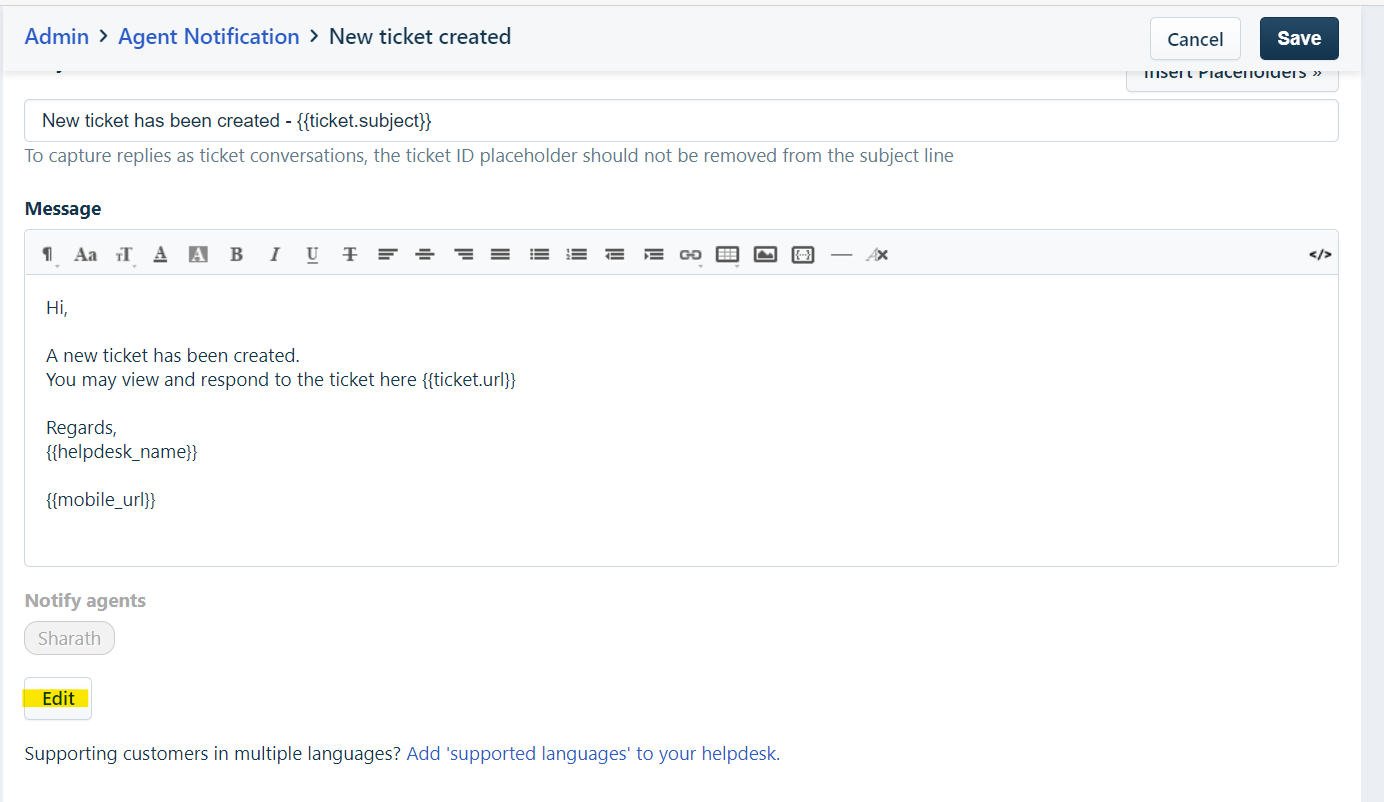
POWERED BY SCALY

Article views count