Last updated: 2025-11-18
``` Note: This feature works the same across all Freshservice products. Some screenshots or articles may reflect older designs, but the functionality remains unchanged. If certain options do not appear in your account, they may not be included in your current plan. ```
Have you had agents spend most of their time planning their work before executing it? Does it feel like there’s always so much data, that you lose track on what’s important? The go-to solution you’re looking for is custom dashboards.
Custom Dashboard will help agents cut through data clutter and get down to what really matters. The data will be consolidated in real-time and shown in a single screen that will help them prioritize and manage work better.
This visual display of data also reveals critical insights and metrics that lead to better decision-making, improved productivity and enhanced performance.
What’s new?
Agents can now drag, drop and reorder widgets across the dashboard and customize them based on their needs.
Let’s see the multiple widgets available

How to customize the dashboard?


Heads Up
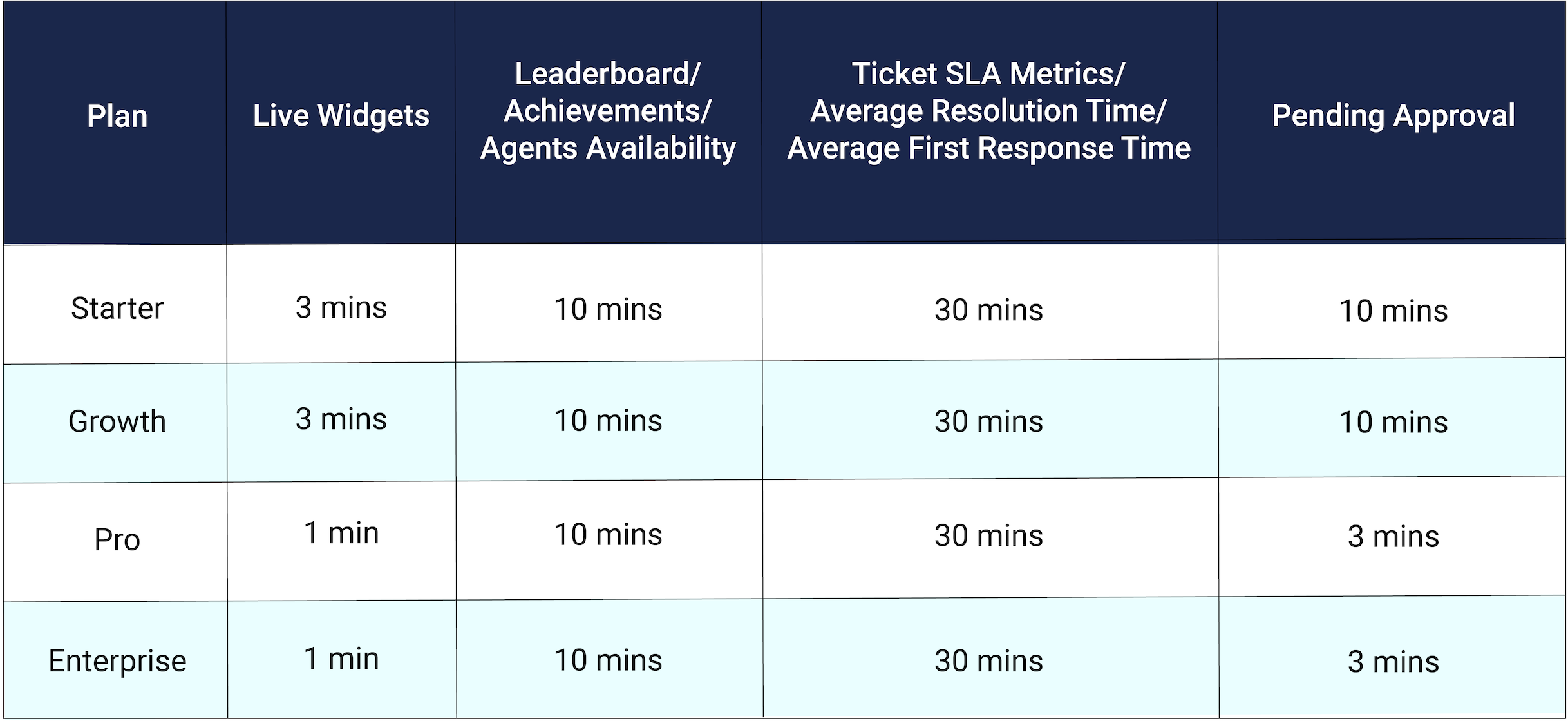
- 3 Agent availability widgets,
- 3 Analytics widgets which include Ticket SLA Metrics, Average Resolution Time, Average First Response Time,
- 1 Leaderboard widget,
- 1 Achievements widget and
- 1 Pending Approval widget will be displayed in the dashboard.