Last updated: 2025-12-09
``` TABLE OF CONTENTSIntegration of monitoring tools in Freshservice Noise reduction in Freshservice Accessing Alerts within Freshservice Incident creation and resolution Alert reporting & analytics ```
Freshservice Alert Management enables ITOps & NOC Teams to oversee the status of the IT infrastructure issues from within their IT service desk. Freshservice Alert Management tackles noise, provides a real-time view of alerts on a single pane of glass, and automates incident creation, routing, and resolution. Here’s a bird’s eye view of how it is done.
Integration of monitoring tools in Freshservice
While Freshservice offers out-of-the-box integrations with a growing list of popular monitoring tools, it can integrate with any tool in the world using webhooks.
In either case, the payload is normalised and severity values mapped to Freshservice values. Establishing a common standard to interpret notifications from multiple monitoring tools has dual benefits:
Noise reduction in Freshservice
Freshservice reduces noise in three ways to simplify alert management:
Accessing Alerts within Freshservice
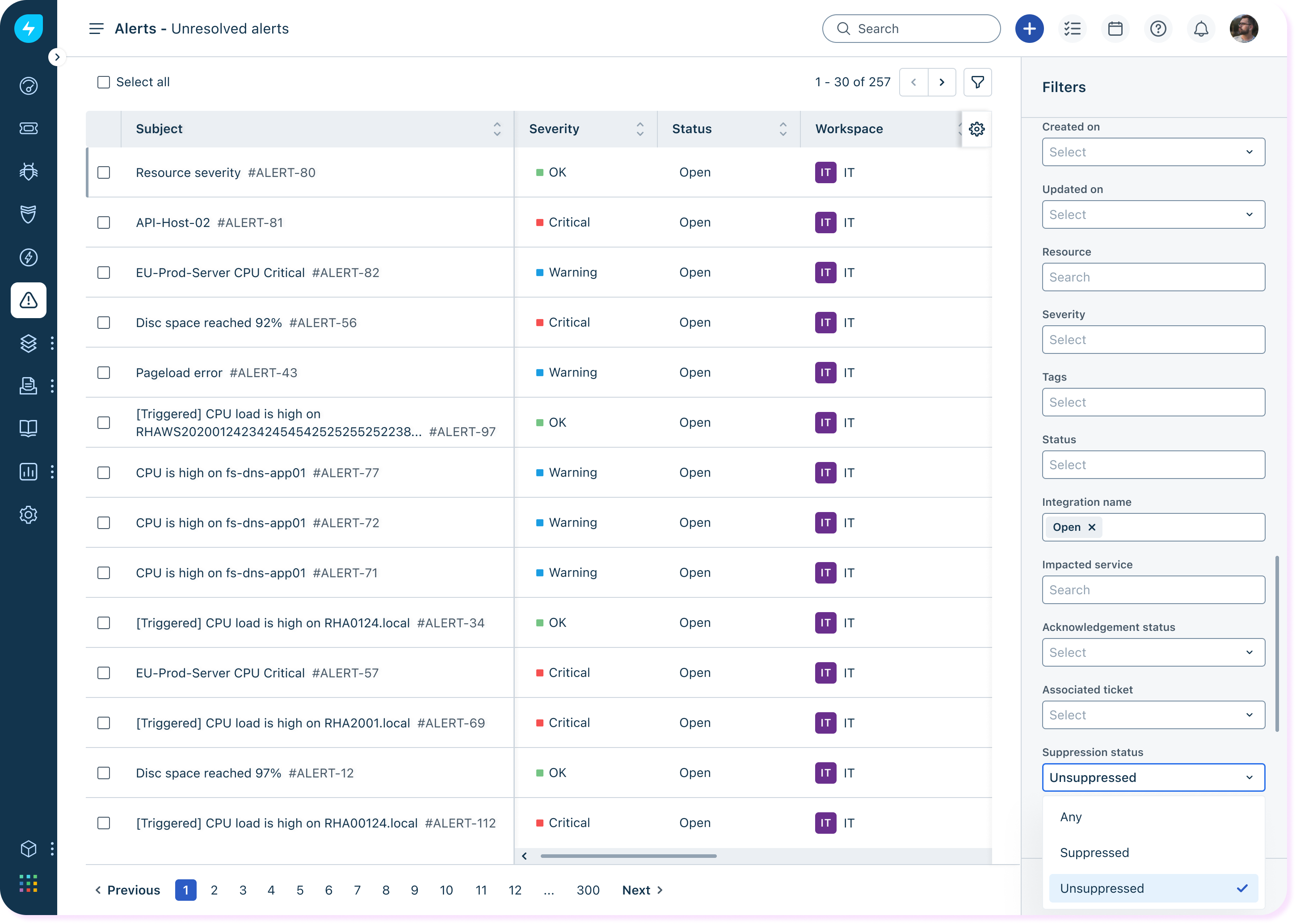
Once you’ve set up Alert Management, Freshservice will start receiving notifications from your monitoring tools. These notifications are treated for noise reduction, after which alerts are displayed on the Alerts List page which can be accessed by clicking on the Alerts icon on the left nav bar.

View all open alerts under the Alert ID column. Each alert has an associated subject, severity, last updated details, the resource, and the associated incident if any.
Use the filter option on the top right corner to filter alerts based on created date, severity, resource, suppression status, etc.
Incident creation and resolution
Freshservice enables automatic creation and resolution of Incidents based on Alert Workflows. An Alert Workflow offers nested if-then-else rules in a single automator. You can specify precisely when a workflow should run, either when an alert is created or updated. You can choose to trigger workflows if the severity is updated to certain value or if the alert status changes. You can also assign incidents created from an alert directly to specific agents and/or agent groups based on predefined criteria.
Alert reporting & analytics
Use the Analytics section to get a granular view of your digital infrastructure. Explore the system-curated Alerts report. Get a visual snapshot of alerts and incidents created over the past 30 days, the resources generating the most alerts, and more. Create your own custom report if you are keen to dig deeper.

Now that you are familiar with the concept of Alert Management in Freshservice, check out these related resources to start making the most of this feature: