Last updated: 2026-03-16
Source: https://support.freshservice.com/support/solutions/articles/200393-freshservice-discovery-agent
Freshservice Discovery Agent
Note: We've updated our pricing and packaging. The Discovery Agent feature is available on Garden, Estate, and Forest plans for customers who signed up before November 02, 2020.
Overview
The Discovery Agent can be installed on all Windows, Mac, and Linux machines. It collects the machine’s hardware and software information and updates Freshservice regularly without the need for further intervention from the respective user(s). Besides making asset discovery extremely easy, it helps you keep track of your assets better in the long run.
The Discovery Agent uses two update logics to send information to Freshservice:
Downloading the Discovery Agent
The Discovery Agent for Windows, Mac, and Linux operating systems can be downloaded directly from your Freshservice Portal.
1\. Go to Admin > Global Settings > Asset Management > Discovery Hub.
2\. Click Configure Agent and Probe in the Basic discovery section.
The Discovery page for setting up Agent and Probe opens in a new tab.
3\. In the Agent tab, choose the required Operating system.
4\. Click Download Agent.
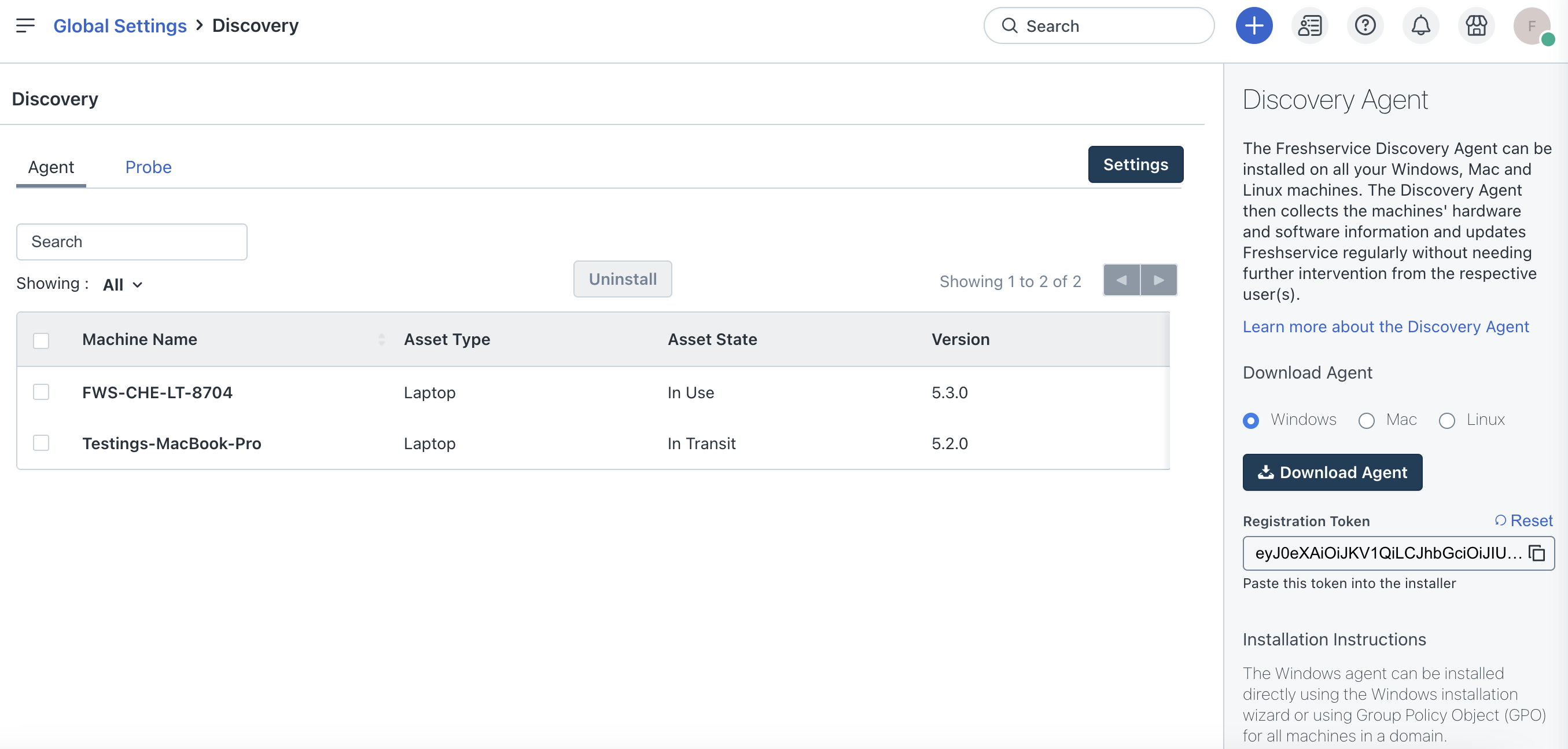
Installing the Agent
There are multiple ways in which the Discovery Agent can be deployed for each operating system.
Windows
1\. To install on a single machine.
2\. To install on all machines in a domain, use Group Policy Object.
3\. To install on all machines in a workgroup, use the PsExec tool.
Mac
To install on single or multiple machines, see Installing Discovery Agent (Mac).
Linux
To install on a Linux machine, run the script using the command: >sudo python FS-Linux-Agent.py
Supported Operating Systems
| Windows | Mac | Linux |
|---|---|---|
| Windows 11<br>Windows 10<br>Windows 8<br>Windows 8.1<br>Windows 7<br>Windows 2008<br>Windows 2008 R2<br>Windows 2012<br>Windows 2012 R2<br>Windows 2016<br>Windows 2019<br>Windows 2022 | macOS Catalina (10.15)<br>BigSur 11.3.1 (compatible with M1 chipset also)<br>Monterey Mac OS (12.0.1) in M1 chipset<br>Ventura<br>Sonoma<br>Sequoia<br>Tahoe | Ubuntu 20.04 <br>Ubuntu 19.04 <br>Ubuntu 18.04 <br>Ubuntu 22.04<br>Ubuntu 24<br>CentOS 8<br>CentOS 7.1<br>CentOS 7.3<br>CentO 7.9<br>Debian 11.6<br>RedHat 7<br>RedHat 7.3<br>SUSE15.5<br>Oracle9.3 |
Note:
Prerequisites
.Net runtime library dependencies
Specific to Linux agents
- GNU C Library (glibc)
- GNU C++ Library
- GCC low-level runtime library
- ICU
- Kerberos
- Open SSL
- zlib compression library
Linux distribution-specific dependencies
- Libc6
- Libgcc1
- Libgssapi-krb5-2
- libicu52 (for 14.x)
- libicu55 (for 16.x)
- libicu60 (for 18.x)
- libicu66 (for 20.x)
- libssl1.0.0 (for 14.x, 16.x)
- libssl1.1 (for 18.x, 20.x)
- libstdc++6
- zlib1g
- icu-libs
- krb5-libs
- libgcc
- libgdiplus (if the .NET app requires the System.Drawing.Common assembly)
- libintl
- libssl1.1 (Alpine v3.9 or greater)
- libssl1.0 (Alpine v3.8 or lower)
- libstdc++
- zlib
- krb5-libs
- libicu
- openssl-libs
- zlib
- krb5-libs
- libicu
- openssl-libs
- zlib
- libc6
- libgcc-s1
- libgssapi-krb5-2
- libicu52 (for 8.x)
- libicu57 (for 9.x)
- libicu63 (for 10.x)
- libicu67 (for 11.x)
- libssl1.0.0 (for 8.x)
- libssl1.1 (for 9.x-11.x)
- libstdc++6
- Zlib1g
- krb5-libs
- libicu
- openssl-libs
- zlib
- krb5
- libicu
- libopenssl1\_0\_0
- krb5
- libicu
- libopenssl1\_1
Support for the following Windows OS versions/flavors is deprecated as of 21 September, 2017.
Support for the following Mac and Linux OS versions/flavors is deprecated as of 01 November, 2024.
FAQs
1\. Does the Discovery Agent auto-sync on its own?
When an end user makes changes to any asset/device, and the device is online, the Discovery Agent detects this based on the unique identifier (Serial Number), and updates the corresponding asset in the Freshservice inventory.
2\. Does the Discovery Agent auto-update on its own?
Whenever Freshservice releases a new version of the Discovery Agent, the Agent will automatically get updated.
3\. Can the Discovery Agent sync be force-updated, similar to Probe?
As the sync with the Discovery Agent is automatic, the sync occurs only in scenarios mentioned in FAQ1. Alternatively, the Discovery Agent performs a scheduled sync of the device once every day, apart from the detected changes.
4\. On what basis does the Discovery Agent create and update the assets in the inventory?
The Serial Number of the asset being scanned by the Discovery Agent is the primary and unique identifier for the asset import/update in the inventory. If there are no serial number matches, a new asset is created. If a serial number match is found, then the matched asset is updated.
5\. How long does it take for the Discovery Agent to sync assets from your IT service desk?
The Discovery Agent automatically syncs all assets in the Freshservice account. The Sync is typically completed within a few hours. The maximum time taken could be up to 24 hours.