Last updated: 2025-07-01
Source: https://support.freshservice.com/support/solutions/articles/50000000332-how-to-delete-an-agent-
``` Note: You are viewing Freshservice documentation. For Freshservice for MSPs, visit the MSP Support Portal. ```
This article outlines how to manage agent accounts, including steps to deactivate or permanently remove agents, along with the impact of each action.
You can remove an occasional or full-time agent from your account. The following options are available on the application:
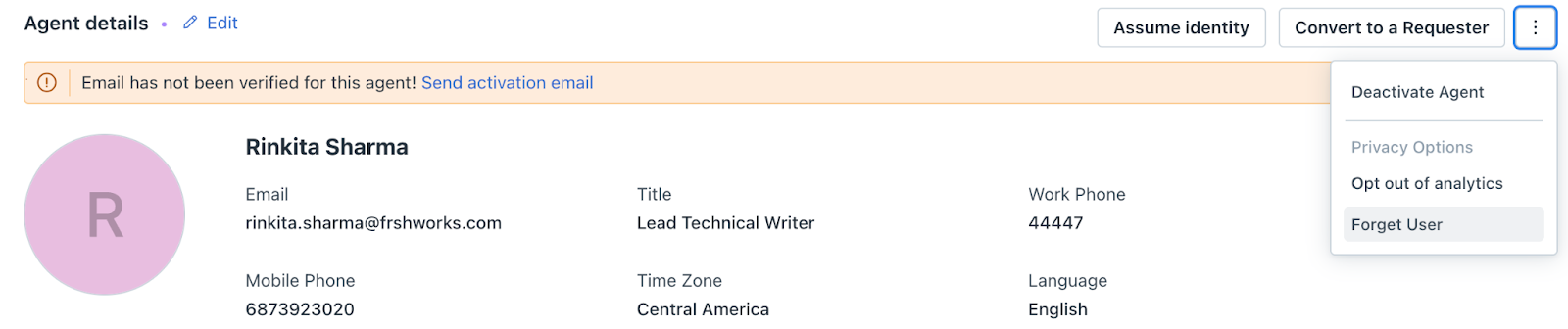
Deactivate an agent
Follow these steps to deactivate an agent from your account.
 > select the workspace > User Management > Agents.
3. Select the agent that you want to deactivate. The Agent details page appears.
4. Click the more options  at the top right corner and click Deactivate. A confirmation message appears.
5. Click Yes, deactivate.
Impacted areas after deactivating an agent
The following table describes the impacted areas after the agent deactivation.
| Impacted areas | Automatic changes | Action required |
|---|---|---|
| Login | Unable to log in to Freshservice.<br>Logout from the mobile application | |
| Tickets, problems, assets, and projects | No longer assignable to any entities. | |
| Tickets | Tickets with Open, In Progress, or Pending statuses will automatically become unassigned. | |
| Tickets with Resolved and Closed statuses will remain unchanged. | ||
| Account-level configurations | Removed from all account-level <br>configurations.<br>Agent is no longer designated as a department head.<br>Agent's account is set to inactive. | |
| Workflow Automator | Cannot be removed automatically. | Manually remove the agent from the associated workflow. |
| Active Directory (AD) | Automatically deactivated in Freshservice if the agent is deleted in AD. | |
| Reports | The reports created by the deactivated agent will be moved to trash. Also, the report will not appear on the All Reports page. | Make a copy of the report within 180 days after the agent's deactivation. |
| Schedule Reports | You will continue to receive scheduled reports created by the deactivated agent. | |
| Workflow Automator | Workflows created by deactivated agents will remain active. | You need to manually deactivate these workflows. |
| Audit log | All changes are recorded in the audit logs for tracking |
Forget User
When you use the Forget User option, the agent is removed from the account.
Impacted areas after using the Forget User option
The following table describes the impacted areas after the agent is removed.
| Impacted areas | Changes |
| Incidents and Notes | All incidents and notes (public and private) created by the agent will be deleted. |
| Service Requests | All service requests made by the agent will be deleted. |
| Activities Tab | The Forget User action will be recorded. |
| Audit Logs | Previous actions performed by the agent, including their name, will be listed. |
Data cleanup after deactivation
Once an agent is deactivated, a background process is triggered to ensure the agent is removed from all relevant areas. Below is a breakdown of the data cleanup process:
| Agent removal from system features | |
| Tickets and Projects | The agent will be removed from any ticket and change templates<br>The agent will no longer be the owner of any Projects, Changes, or Tasks.<br>The agent will be removed from scheduled ticket actions |
| Pending Approvals | Any contract renewal approvals assigned to the agent will be automatically rejected |
| Freshcaller | The agent will be removed from Freshcaller and any active calls |
| Group escalations | The agent will be removed from all group escalations. |
| SLA policies | The agent will be removed from all SLA policies |
| Scenario actions | The agent will be removed from scenario actions (e.g., add watcher, responder, or send email to agent). |
| Admin notifications | The agent's email will be cleared from admin notification settings |
| Deletion of agent-specific data | |
| Sandbox environment | The agent will be deactivated in the sandbox. |
| Canned Responses | Any personal canned responses created by the agent will be deleted |
| Scenario Automations | Personal scenario automations will be removed |
| Scheduled Tasks and Report Filters | Any scheduled tasks or report filters created by the agent will be deleted |
| Other areas | The agent will be removed from Leaderboards, Dashboards, Quests and Badges. |