Last updated: 2021-06-18
Source: https://support.freshdesk.com/support/solutions/articles/210531-the-xero-app
Freshdesk’s app with Xero allows you to record Freshdesk timesheet entries as billable items on Xero draft invoices. The app enables businesses to create invoices for time spent on customer service right from within Freshdesk.Your agents can now create draft invoices and link them to time-sheet entries of tickets in Freshdesk.
Note:In order to prevent agents from creating multiple invoices in Xero for the same time-sheet entry, Freshdesk limits you to associating a ticket with a time-sheet entry to only one invoice at a time.Agents cannot make changes to or delete an existing invoice.If an agent wishes to change the invoice linked to a ticket, an Admin must first delete the existing draft invoice in Xero.Then, agents must unlink the existing invoice in Freshdesk and create a new one.Therefore,we highly recommend that you link time-sheet entries to a draft invoice only after the ticket has been resolved completely and no new timesheet entry is expected.
A quick to integrating Xero with Freshdesk:


_'Sales' will always be selected by default. If 'Sales' does not exist, the first account that exists under 'Revenue' in Xero will be considered default._
Using the App:
Agents can use the Freshdesk-Xero app to associate the time-sheets of the tickets they’ve resolved to Xero draft invoices. Once a ticket has been closed and time-sheets finalized, the agent can select the 'Create Invoice' button to create a draft invoice in Xero.

If the ticket requester’s company name or email ID matches a contact in Xero, you'll be able to see all the associated invoices for that contact/company.
When an agent clicks on 'Create Invoice', the time-sheet for the current ticket will be automatically populated on the draft invoice screen. Agents can associate each time-sheet entry with an inventory item. Agents will be able to select only those items which Admins have authorised for display via the app configuration page. For invoices that are already associated with a ticket, agents can click on the 'View' option; these entries would be read-only.
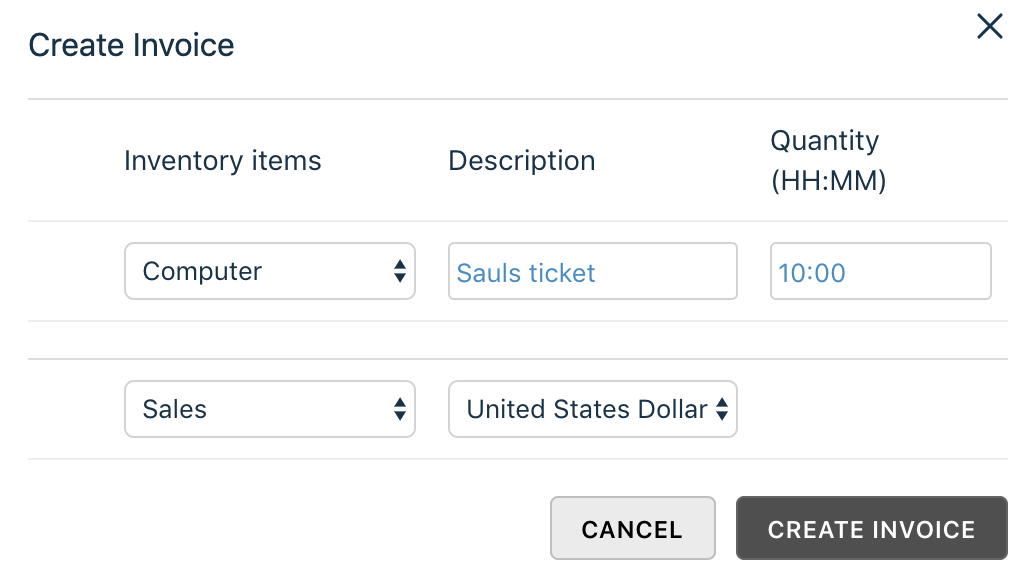
If an inventory item from Xero is selected, then the unit price and related tax rates will be automatically applied in Xero. If no inventory item exists or if an agent chooses not to link an inventory item with a time-sheet entry, agents will have to select an 'Account' name. This 'Account' name will be apply to all time-sheet entries which do not have inventory items linked with them.
Once an agent has filled in all the details, clicking on the 'Create' button will link the resulting Xero draft invoice to the Freshdesk ticket. Subsequently on the ticket details page, agents can see the invoice name and current status of the invoice. They can also view additional details of the invoice any time by clicking on the 'View' link.

Note:Admins have to approve draft invoices in Xero before it is sent out to customers. Admins will also have the ability to delete invoices from Xero.
FAQs
1. I keep getting this error message. Why?

The app allows you to link timesheet entries to Xero drafts only if the 'Company' of the Requester in your Freshdesk account matches a 'Contact' field in your Xero. You can also add timesheet entries to drafts if the Requester email ID in Freshdesk matches a Primary Contact’s email ID in Xero.
If neither of the details match, the Xero app will display the above message.
2. When I open the Xero app, there is no 'Create Invoice' button. Why?For the Xero app to display any control to 'Create Invoice', the ticket must have a timesheet entry attached to it. If you attached a timesheet entry to the ticket and the app still does not show the 'Create Invoice' button, please refresh the page. 3. I added a ticket/made a mistake when adding a ticket to an invoice but unable to remove or change it. How can I do it?
As of now, invoices, once created, cannot be edited via the app.If you wish to remove any tickets added to a draft invoice or make any other changes, you will have to do it via your Xero Portal. Therefore, it is advisable to only add transactions once the time tracking is final and the invoice to which it is desired is determined. 4. If I create an invoice via the app, will that be automatically sent to the customer?
No. The invoices that you create in the Xero app for Freshdesk are only ' Draft Invoices'. The admin of your Xero account will have to approve all Draft Invoices before it is issued to a customer. 5. I can't change the time in the invoice. How do I do it?
The time added to the invoice is pulled directly from the Freshdesk ticket's time-sheet entry. To make any changes to the time in the invoice, change the timesheet entry, delete the existing draft invoice with the incorrect time and create a new one. 6. Is it compulsory to select a 'Chart of Accounts' option in the 'Create Invoice' screen?
No. It isn’t. Selecting an Inventory item will automatically associate the invoice with the appropriate 'Chart of Account' for that Inventory item. 7. What is the unit of time that is passed to Xero when generating an invoice?
The units are passed in terms of hours. That is, if you have entered a time-sheet entry for 1:15 or 1 Hour and 15 Minutes, Xero will process your invoice unit as 1.25 and bill accordingly. 8. I haven’t selected an inventory item from the list to link to the invoice. Should I select a 'Chart of Accounts' option now?
Yes. Normally, your helpdesk will automatically associate an invoice to a 'Chart of Accounts' option based on the item you’ve selected. If you’ve selected no items at all, then you must select a “Chart of Accounts” option to link to your ticket time-sheet entries. 9. There are five time-sheet entries in one invoice. I’ve linked inventory items for two of them. If I link an account name from 'Chart of Accounts' to the invoice now, what will happen to the entries?
Selecting an account name in the above scenario will cause three things to happen:
1\. The time-sheet entries with inventory items already linked will be undisturbed.
2\. The account name that you select from Chart of Accounts will be linked to the other three time-sheet entries that have no inventory items linked to them.
3\. The time-sheet entries with Account names linked to them will be passed to Xero with a unit value of 1 (one). While all related tax rates will be applied, employees will have to make modifications in number of units in Xero before the draft invoice is approved.