Last updated: 2021-02-09
When you manage your SaaS applications in an independent environment, quickly acting on them becomes cumbersome as your service management tools will be decoupled from it.
With Freshservice, take insight-driven actions with scalable automation and integrated service delivery to increase ROI right from areas where you can reduce SaaS spend. With SaaS management you can:
How do we enable this in Freshservice?
When you want to act on optimizing usage for an application, say de-provision a user license, you would want to maintain a record of the same as an activity log. Also, there might be multiple teams involved and you will have to assign the de-provisioning request to the right teams.
To enable integrated service delivery to optimize application usage, your actions are created as service requests can be routed and assigned to the right teams or automatically resolved by setting up a workflow.
SaaS Actions service item
For all accounts with SaaS management add-on enabled, a service item is added for SaaS Actions under SaaS Management category in the service catalog. This service item will be used to capture the actions you initiate from the software module and will not be visible to your employees.
Note: If you delete this service item or rename it (or don’t find this in your service catalog), your SaaS actions will not work as expected in your Software module. If you delete the service item, you can set it up by:

How do I take action? 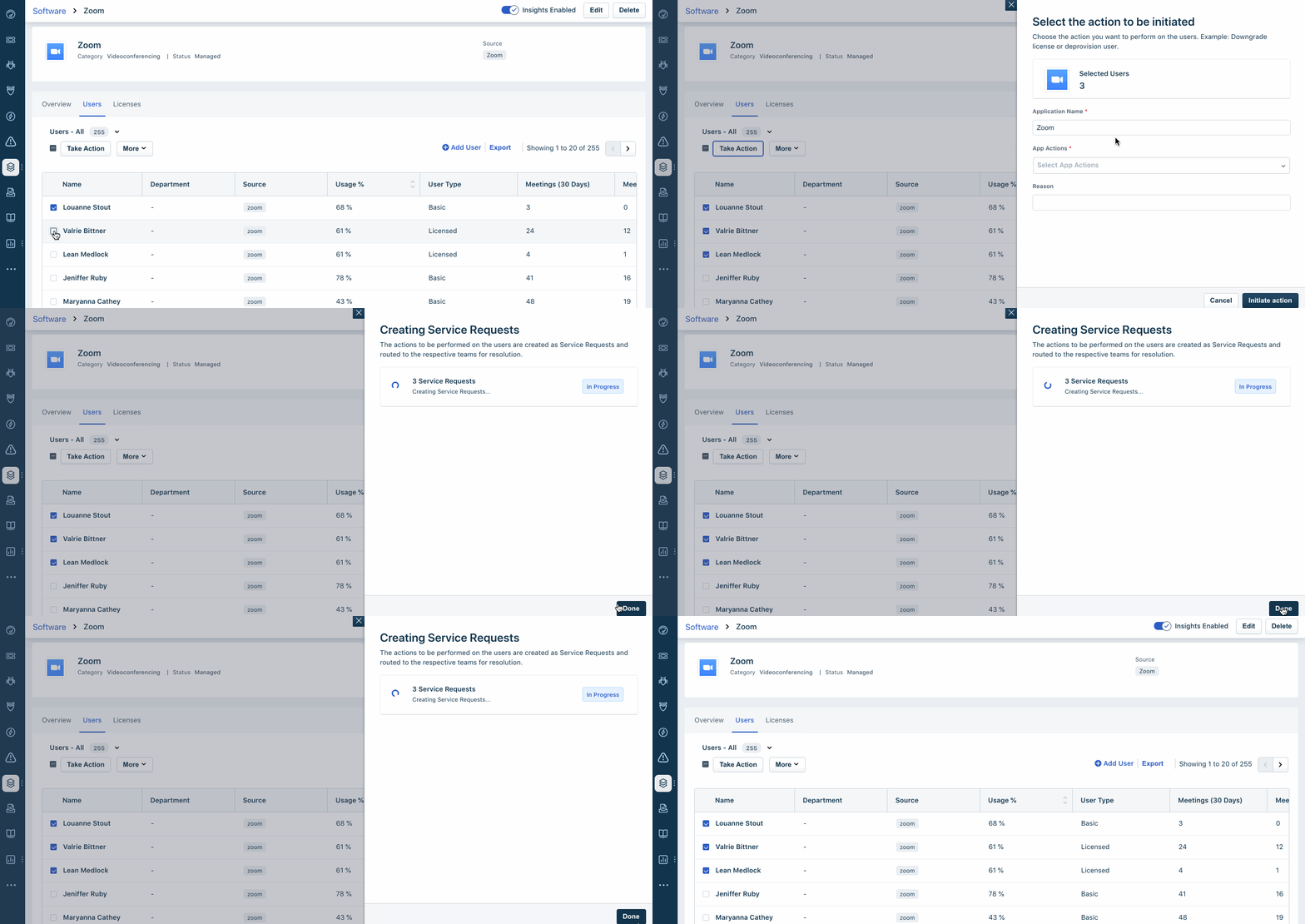
- App Name: Automatically updated based on the app
- App Action: Select the action to be initiated. Example: Deprovision user