Last updated: 2026-05-13
The following documentation explains the computation logic used to determine risk profiles, survey results, and the cumulative risk scores within the change risk assessment framework.
Risk Profile scoring computation
This section describes the step-by-step process used to calculate the automated risk score for change requests. The algorithm evaluates change parameters against predefined policies and rules to provide a standardized risk assessment.
Initiation and policy selection
The scoring process is triggered automatically whenever a change request is created or updated, provided it meets specific policy conditions.
Scoring logic: Rules and parameters
For every parameter defined in the selected Risk Profile (for example, Impact, Planned Start Date), the system follows a specific numeric conversion process:
Rule sorting
Scoring rules for each parameter are sorted in descending order by their score value (for example, 10 down to 0). If rules share the same score, they retain their configured order.
Evaluation process
Final Risk Profile score calculation
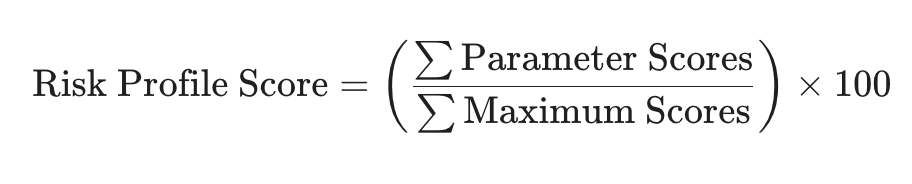
The final score is expressed as a percentage. The calculation method depends on whether weights are assigned to the parameters.
Method A: Without weights
The score is calculated by dividing the total earned points by the total possible points.
Method B: With weights
If weights are configured, the system first determines Weighted Parameter Scores (Score × Weight) and Weighted Maximum Scores (Max Score × Weight).

Calculation example
The following tables demonstrate how a change request is scored based on specific rules and values.
Sample change request data
| Change Parameter | Value |
| Impact | High |
| Roll-out Plan Details | Includes word "servers" |
| Impacted Employees | 450 |
| Blackout Window Overlap | TRUE |
| Planned Start Date | null |
Comparison of scoring results
| Metric | Without weights | With weights |
| Sum of Parameter Scores | 27 | 479 (Weighted) |
| Sum of Maximum Scores | 39 | 648 (Weighted) |
| Final Risk Score | 69.2 | 73.9 |
Risk Survey scoring computation
This section provides a comprehensive overview of the scoring algorithm used to calculate risk profiles for change requests. The process involves evaluating specific risk policies, identifying applicable surveys, and calculating scores based on response rules and optional weighting.
Scoring workflow
The risk calculation follows a structured sequence to ensure every change request is evaluated against the correct criteria.
Convert responses to numeric scores
Each question in a survey is processed individually to determine its contribution to the overall risk score.
Sort and evaluate
Assign scores
Calculation methodology
The final Risk Survey score is expressed as a percentage.
Calculation without weights
When weights are not configured, the formula is:

Calculation with weights
If weights are defined for parameters, the system first calculates weighted values:
The formula for the weighted score is:

Example scenarios
The following examples demonstrate how responses are converted into a final risk percentage.
Sample question configuration
| Risk question | Type | Scoring rules |
| Implementer availability | Multichoice | Staff available (0), Key stakeholders (2), Limited staff (4), On-call only (8) |
| Technical difficulty | Rating scale | Very easy (0) ... Neutral (5) ... Very difficult (10) |
| Validated in Pre-Prod | Yes/No | No (0), Yes (10) |
Example 1: Calculation without weights
In this scenario, the user responded "All staff available," "Neutral," and "No".
| Risk question | Question score | Maximum score |
| Implementer availability | 0 | 8 |
| Technical difficulty | 5 | 10 |
| Validated in Pre-Prod | 10 | 10 |
| SUM | 15 | 28 |
Final score: (15 / 28) x 100 = 53.57
Example 2: Calculation with weights
Using the same responses but applying specific weights to each question.
| Risk question | Weight | Weighted question score | Weighted max score |
| Implementer availability | 35 | 0 | 280 |
| Technical difficulty | 30 | 150 | 300 |
| Validated in Pre-Prod | 35 | 350 | 350 |
| SUM | 500 | 730 |
Final score: (500 / 730) x 100 = 68.49
Overall risk score computation
The overall risk score is determined using a weighted average method that balances two primary inputs: the Risk Profile score and the Risk Survey score. This methodology ensures that different risk factors are prioritized according to organizational policy.
Step 1: Identify base scores
The calculation begins by identifying the two core metrics:
Example: \> \\ Risk profile score = 75 \\ Risk survey score = 60
Step 2: Determine weightage
Assign weightage to each score based on current organizational policy. The combined weightage of both factors must always total 100.
Example: \> \\ Risk profile weightage = 70 \\ Risk survey weightage = 30
Step 3: Calculation process
To reach the final result, the weighted scores are computed individually before being combined.
Compute weighted Risk Profile score
Multiply the risk profile score by its assigned weightage.
Compute weighted Risk Survey score
Multiply the risk survey score by its assigned weightage.
Compute overall risk score
Add the two weighted scores together and divide by 100.
Step 4: Finalization and mapping
The final computed score is mapped to a risk level (Low, Medium, High, Very High) and over-rides the risk level in the default “Risk” field.